Why supplier pricing management breaks down at scale
Here's something most people don't talk about: NetSuite's pricing and catalog tools work just fine, until you're dealing with volume.
One vendor, one SKU per item, a manageable order count? The native flow holds up. But the moment you're working with overlapping suppliers, thousands of SKUs, and pricing that shifts based on freight, margins, and availability, the cracks appear fast.
Manually reviewing purchase orders to see if a vendor's price changed. Copy-pasting tracking numbers into item fulfillments. Updating item records one by one. These aren't edge cases, they're the daily reality for teams trying to scale NetSuite supplier pricing management beyond a handful of suppliers.
This guide walks through what NetSuite does well, where it falls short for catalog and pricing work at scale, and how automation changes the equation.
How NetSuite handles pricing natively
NetSuite's Order Management module includes solid foundational tools for pricing and catalog control. The platform lets you set price levels per item, configure quantity-based pricing, and assign preferred vendors to specific SKUs. When a sales order is approved for a drop ship item, NetSuite automatically generates a linked purchase order to that preferred vendor, and can even email the PO automatically.
On the catalog side, NetSuite's item records store pricing alongside product attributes, vendor associations, and fulfillment preferences. The inventory management module tracks item traceability via serial numbers, lot numbers, and FIFO, which is valuable for compliance-heavy operations.
For teams running a contained catalog with stable vendor relationships, this works. The accounting stays clean, revenue and COGS are recorded without touching inventory, and the paper trail is solid.
The real challenge: catalog updates across multiple vendors
The trouble starts when you introduce the volume and variety that comes with drop shipping at scale.
Creating item records in NetSuite is a manual, configuration-heavy process. Based on how the setup works, each item needs specific fields enabled, particularly the drop ship designation and the preferred vendor assignment. Get either of those wrong, and you're looking at downstream reconciliation issues.
That's before considering the sheer number of records involved. Drop shipping often means managing hundreds of thousands of SKUs from multiple vendors. And here's the practical reality: not every SKU from a vendor is worth selling. But without a way to browse and filter vendor inventory before creating item records in NetSuite, teams end up creating records for items they'll never actually list, and then have to clean up the mess later.
Keeping those records accurate over time is its own challenge. Vendors change pricing. New products get added. Items go out of stock. Without a system that automatically reflects those changes, your catalog drifts from reality, and customers end up ordering items you can't actually fulfill.
Where NetSuite's preferred vendor logic creates bottlenecks
This is the part worth spending time on, because it shapes nearly every downstream workflow.
NetSuite's purchase order automation works off a single rule: route to the preferred vendor. That's the extent of the built-in order routing logic. One preferred vendor per item, and that's who gets the PO.
| Scenario | NetSuite native behavior |
|---|---|
| Multiple vendors carry the same SKU | Routes to whichever vendor is marked preferred, no comparison |
| Vendor goes out of stock | PO goes out anyway, you find out when they push back |
| Vendor pricing changes | No automatic update, manual review required |
| Split order across two vendors | Each item goes to its own preferred vendor regardless of margin impact |
| Distance-based routing | Not supported natively |
For businesses where margins are tight and vendors are interchangeable on a given SKU, this matters. The preferred vendor today might not be the lowest-cost option tomorrow. And with NetSuite drop ship workflows, every mis-routed PO is a manual correction, opening the order, updating the vendor, verifying the change didn't break anything else.
The other piece is vendor communication. Once a PO is created, NetSuite's native options for getting it to the vendor are limited: email or fax. If your vendors require EDI, API connections, or CSV file feeds, you're looking at custom development or third-party tooling to bridge that gap.
Relying solely on static preferred vendor designations introduces severe margin risk and operational bottlenecks. Moving from fixed supplier preferences to dynamic routing lets operations automatically select the optimal vendor for every order based on real-time cost, stock, and location data.
How do you solve the vendor routing problem?
The fix starts with understanding why the preferred vendor model fails, then replacing it with routing that responds to real conditions.
Moving beyond preferred vendor limitations
If you've worked with NetSuite dropshipping for any length of time, you've experienced this frustration. An order comes in. NetSuite automatically creates a purchase order for your "preferred vendor." You check the vendor's inventory feed and discover they're out of stock. Now you need to manually change the PO to a different vendor, update the records, and hope nothing breaks in the process.
This happens dozens or hundreds of times per week. It's not just annoying, it's actively costing you money and limiting your growth. The preferred vendor model made sense in an era of simpler supply chains, but modern dropshipping demands something smarter.
Why is single-vendor routing killing your margins?
The preferred vendor trap seems logical at first glance. You designate your best vendor for each product, and orders automatically route to them. Set it and forget it, right? The problem is that "best vendor" isn't a static designation. It changes based on constantly shifting factors:
- Inventory availability: your preferred vendor runs out of stock and suddenly isn't the best choice, but NetSuite keeps routing orders their way, forcing you to intervene or disappoint customers.
- Pricing fluctuations: vendors adjust pricing for promotions, volume discounts, and competitive pressure, so the vendor who was cheapest three months ago might now be the most expensive.
- Shipping costs and speed: a vendor closer to your customer delivers faster and cheaper, but NetSuite doesn't consider geography, so you pay higher fees and longer transit times.
- Vendor performance: some vendors ship on time and pack carefully, others are late with high damage rates, and preferred vendor routing gives you no way to shift volume toward the reliable ones.
Solving single-vendor limitations requires dynamic multi-supplier routing rules. By evaluating cost, proximity, and supplier availability in real time, businesses automate decision-making across their entire fulfillment network.
What is dynamic multi-supplier order routing?
Dynamic order routing means your system evaluates multiple potential fulfillment sources for each order in real time, then automatically selects the best option based on current conditions and your business rules. Instead of asking "Who is the preferred vendor for this item?" it asks "Who is the best vendor to fulfill this order right now given inventory, cost, location, and performance?" That shift from static preferences to dynamic decision-making unlocks real efficiency gains and cost savings.
How dynamic routing works
When an order comes in, the routing engine identifies which vendors, and potentially your own warehouse, currently have the items in stock. It applies your business rules, scoring each option against criteria like unit and total order cost, shipping cost from vendor location to customer, expected delivery time, vendor performance, order minimums, and strategic preferences. It calculates the optimal route, then creates the purchase order in NetSuite and transmits it to the selected vendor in their required format.
Business rules you can implement
The power of dynamic routing comes from its flexibility. Common logic includes:
- Cost optimization: always select the vendor with the lowest total delivered cost (product price plus shipping) to protect margin on every order.
- Inventory prioritization: route to vendors with the highest available quantities first to reduce backorder risk.
- Speed priority: for expedited orders, choose the fastest vendor regardless of cost.
- Geographic routing: choose the vendor closest to the customer to cut transit time and shipping expense.
- Performance weighting: factor in on-time rate and defect rate, shifting volume away from underperformers.
- Strategic allocation: hold a target distribution across vendors to preserve relationships or hit volume discounts.
- Warehouse first: fulfill from your own inventory before routing to dropship vendors when you hold stock.
- Split order intelligence: decide whether to split across vendors for speed or consolidate with one for lower shipping cost.
Beyond protecting margins on individual orders, dynamic routing eliminates the inventory visibility gaps that cause backorders, so orders only route to vendors with active, verified stock.
How does automated routing reduce backorders?
One of the biggest causes of backorders in dropshipping is simple: you don't know what your vendors actually have in stock until you try to order it. Many vendors send inventory feeds by CSV, API, or EDI, but those might update once a day or less. Between updates, stock changes, popular items sell out, and your data goes stale. Routing on stale data means creating POs for items that aren't available, and now you scramble to find another source or cancel the order.
Dynamic routing platforms fix this by keeping near-real-time inventory sync with your vendors, polling continuously or receiving push notifications when quantities change. When an order arrives, the engine knows within minutes which vendors actually have stock right now, excludes the out-of-stock ones, and routes to an available source, which virtually eliminates creating a PO only to learn the vendor can't fulfill it.
Even with real-time data, a first-choice vendor sometimes can't fulfill, maybe they just sold out or declined the order. Fallback logic handles this automatically, moving to the second-best option, then the third, until it finds a vendor who can complete the order, in seconds, with no one touching it.
Routing also lets you aggregate quantities across vendors into one listing, which preferred vendor routing can't do. If Vendor A has 5 units, Vendor B has 8, and Vendor C has 12, you can safely list the combined quantity instead of three separate listings or risking an oversell, and the system distributes orders across vendors while tracking allocations in real time.
Businesses that implement dynamic routing typically see a 50 to 80 percent reduction in backorders, 90 percent fewer cancelled orders, faster fulfillment from geographic routing, and a 3 to 8 percent margin improvement from always routing to the most cost-effective vendor across thousands of orders.
What automation actually looks like in practice
The key word is automated. Each of those steps can happen without a human in the loop, which matters when you're processing hundreds or thousands of orders.
Without automation, the manual version looks like this: orders come in from your sales channel, get entered into NetSuite, go through an approval process that takes multiple clicks per order, get routed to a preferred vendor that may or may not have the item in stock, and then someone manually enters tracking information once the vendor ships. That's not sustainable at volume.
Automation changes the shape of the work. Instead of processing individual orders, your team reviews exceptions, orders that couldn't be routed automatically, items that need attention, edge cases that require judgment. Everything routine runs on its own.
How Flxpoint fills the gaps
Flxpoint is built specifically for this problem: high-volume drop shipping and multichannel selling where NetSuite is the system of record but can't handle all the operational complexity on its own.
On the catalog side, Flxpoint's digital product catalog lets you browse vendor inventory before creating item records in NetSuite. You can filter down to only the products you want to sell, set eligibility criteria, and then have those item records created in bulk, automatically marked as drop ship items with preferred vendors assigned. What might take five to twenty minutes per record manually happens at scale without the error risk.
On the pricing and vendor side, Flxpoint enables dynamic order routing that goes well beyond NetSuite's preferred vendor logic. When an order comes in, Flxpoint can evaluate which vendor has the item in stock, whose price gives you the best margin, and which source is closest to the customer, then route the order accordingly. That routing can factor in real-time cost data, so if a vendor raises their price, the next order doesn't automatically go to them if a better option exists.
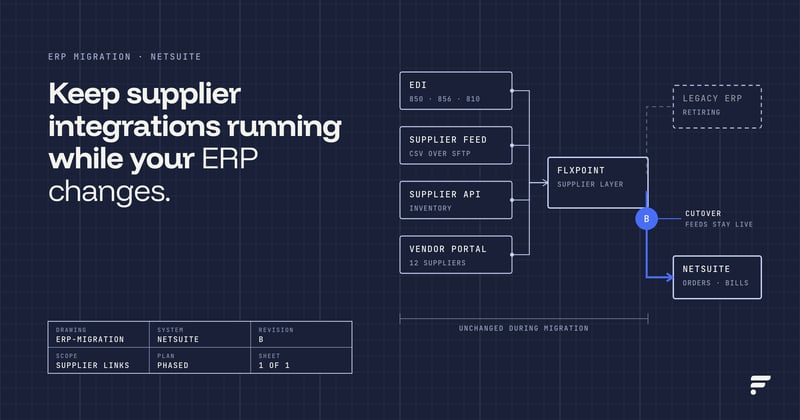
On the connection side, Flxpoint handles vendor diversity in a way NetSuite can't natively. Vendor on EDI? Flxpoint translates and syncs directly into NetSuite. Vendor has an API? It routes orders and pulls tracking in real time. Vendor only sends CSVs? It automates those file feeds on schedule. The platform also has a vendor portal for suppliers who don't have strong automation, letting them log in to fulfill orders and provide inventory updates manually.
On the fulfillment side, Flxpoint creates the item fulfillment automatically when tracking comes back from vendors, no manual copy-paste, so sales orders and purchase orders in NetSuite stay accurate without staff intervention. For multichannel listing, Flxpoint syncs product data and quantity across channels so your listings reflect what vendors actually have available, reducing the overselling that happens when NetSuite's inventory data lags reality.
The role Flxpoint plays is essentially this: NetSuite stays the financial and operational system of record, while Flxpoint handles the vendor communication, routing intelligence, and catalog automation that NetSuite wasn't designed to do at this scale.
Frequently asked questions
How does NetSuite manage supplier pricing?
NetSuite manages pricing through item records and price levels assigned to vendors. Each item can have a preferred vendor with an associated cost. Pricing updates require manual changes to item records or vendor bills unless custom scripts or an integration platform are in place to automate that process.
What challenges exist with supplier catalogs in NetSuite?
The primary challenges are volume and accuracy. Creating and maintaining item records manually doesn't scale across thousands of SKUs and multiple vendors. There is also no native way to browse vendor inventory before creating item records, which leads to either incomplete catalogs or database clutter from products you'll never sell.
Can pricing updates be automated in NetSuite?
Natively, pricing updates require manual intervention. Automation is possible through SuiteScript or a third-party integration platform like Flxpoint that pushes vendor cost data into NetSuite item records on a schedule or continuously in real time.
How do integrations improve catalog updates?
Integrations let vendor inventory and pricing data flow into your catalog automatically, filtering out items that don't meet your criteria, creating item records in bulk, and keeping cost data current without manual entry. A platform like Flxpoint handles this as a continuous sync rather than a one-time import.
Can NetSuite sync product data across channels?
NetSuite's SuiteCommerce module supports some cross-channel sync, but for multichannel operations across Amazon, Shopify, BigCommerce, and others, most teams use a platform like Flxpoint that manages listing sync, product listing automation, and pricing across all channels from one place.
How does dynamic order routing solve the vendor routing problem in NetSuite?
Rather than defaulting to a single static preferred vendor, dynamic order routing evaluates real-time inventory availability, total landed cost (item price plus shipping), vendor location, and supplier performance to automatically select and issue the purchase order to the best vendor for each specific order.
How does automated vendor routing reduce backorders and cancellations?
Automated routing continuously syncs with vendor inventory feeds and uses fallback logic. If a primary supplier goes out of stock, the system redirects the order to an alternate supplier with verified inventory, which typically achieves a 50 to 80 percent reduction in backorders and 90 percent fewer cancelled orders.