
Every order you process is a business decision. You have to decide which distributor should fulfill it. If you route a rifle to a source that can't legally ship it, you create a compliance risk. If you route a simple holster to your most expensive supplier, you lose potential profit. When you sell across distributors like RSR, Lipsey's, and Davidson's, this decision happens hundreds or thousands of times a day, too often for your team to manage manually.
Order routing software handles this.It automatically selects the right source for every order based on cost, inventory, priority, and the compliance rules essential for FFL dealers. This blog explains how routing works, how Flxpoint adds FFL-specific logic, and how you can use it to protect both your profit margins and your license.
Table of contents
- Why routing orders wrong costs you thousands per month
- What intelligent order routing actually means
- How Flxpoint routes firearm orders
- Real routing scenarios for firearms and tactical dealers
- How to set up routing rules with no code
- What routing optimization does to your margin
- Common routing mistakes firearms dealers make
- Flxpoint's routing versus manual and generic tools
- Implementation and support
- Frequently asked questions
Why routing orders wrong costs you thousands per month
Manual routing means a person decides where each order goes, which distributor gets the purchase order. That works at low volume. It falls apart the moment you are running hundreds or thousands of drop ship orders across overlapping catalogs.
The pattern is familiar to anyone who has scaled a firearms drop ship program. Palmetto State Armory processes roughly 3,000 dropship orders a day, and before automating, the team was, in the words of Reuben Bakker, who oversees business systems at PSA, "essentially drowning" handling out-of-stocks, cancellations, and address changes by hand.
Their merchandising team was "manually toggling which vendor we would prefer" every day off stock and pricing reports. The problem, as Bakker explained, is that "stock changes throughout the day every day" and pricing shifts with it. On a multi-line order they were "not necessarily optimizing how those orders go out", just sending it to whoever the preferred vendor happened to be.
Three costs stack up when routing is manual or static.
The first is shipping and fees.
When a five- or six-line order splits across three distributors, you pay shipping on all three purchase orders, plus any drop ship fee each one charges. Bakker put a number on the waste. Send "three POs to three different vendors" and you pay shipping and drop ship fees on each, when there are "significant savings right off the top by just shipping it more efficiently out of one source."
The second is SKU availability.
If a top-ranking product page shows out of stock because your one preferred vendor is dry, you lose the conversion even though other distributors have the item. Bakker called it what it is, "really silly to have an out of stock page when we've got two or three other vendors that might also have that available."
The third is compliance exposure.
Firearms and serialized components have to ship to a licensed FFL, and ammunition carries its own carrier and address restrictions. Route an FFL-required item to a source that cannot ship it to a licensed dealer and you invite chargebacks, canceled orders, and a review of your account. That risk is why so many online retailers never touch this industry at all.
Routing is a hidden margin. Most dealers lose margin every month because a human, or a stale preference setting, is making a decision that a rules engine can make better and faster on every single order.
What intelligent order routing actually means
Intelligent order routing is automated decision logic that picks the best fulfillment source for each order the moment it imports, before anyone on your team touches it. It applies fixed rules to every order. It follows the rules you set around availability, cost, vendor priority, location, and shipping method, and it applies them the same way on every order.
Here is how it works in Flxpoint. When an order arrives from a connected sales channel, Flxpoint imports it, generates one or more fulfillment requests, and routes each request to a source using the method you choose under Settings, Orders. You pick one of two routing methods:
- Preferred source routing, the recommended default. Orders try your number one source first, then your second, then your third, in the priority order you set by dragging sources into rank. Each source has to be toggled on to be eligible.
- Lower cost routing. Flxpoint checks your designated preferred source first, then among the remaining eligible sources it calculates and picks the lowest-cost option automatically.
On top of the method, a routing group lets you rank how ties and edge cases resolve. You can order priorities like preferred sources, single source to keep an order in one shipment, lowest cost within a percentage margin, whether a source has the shipping policy mapped, and closest source within a mileage margin. Each priority can be marked as preferred or required.
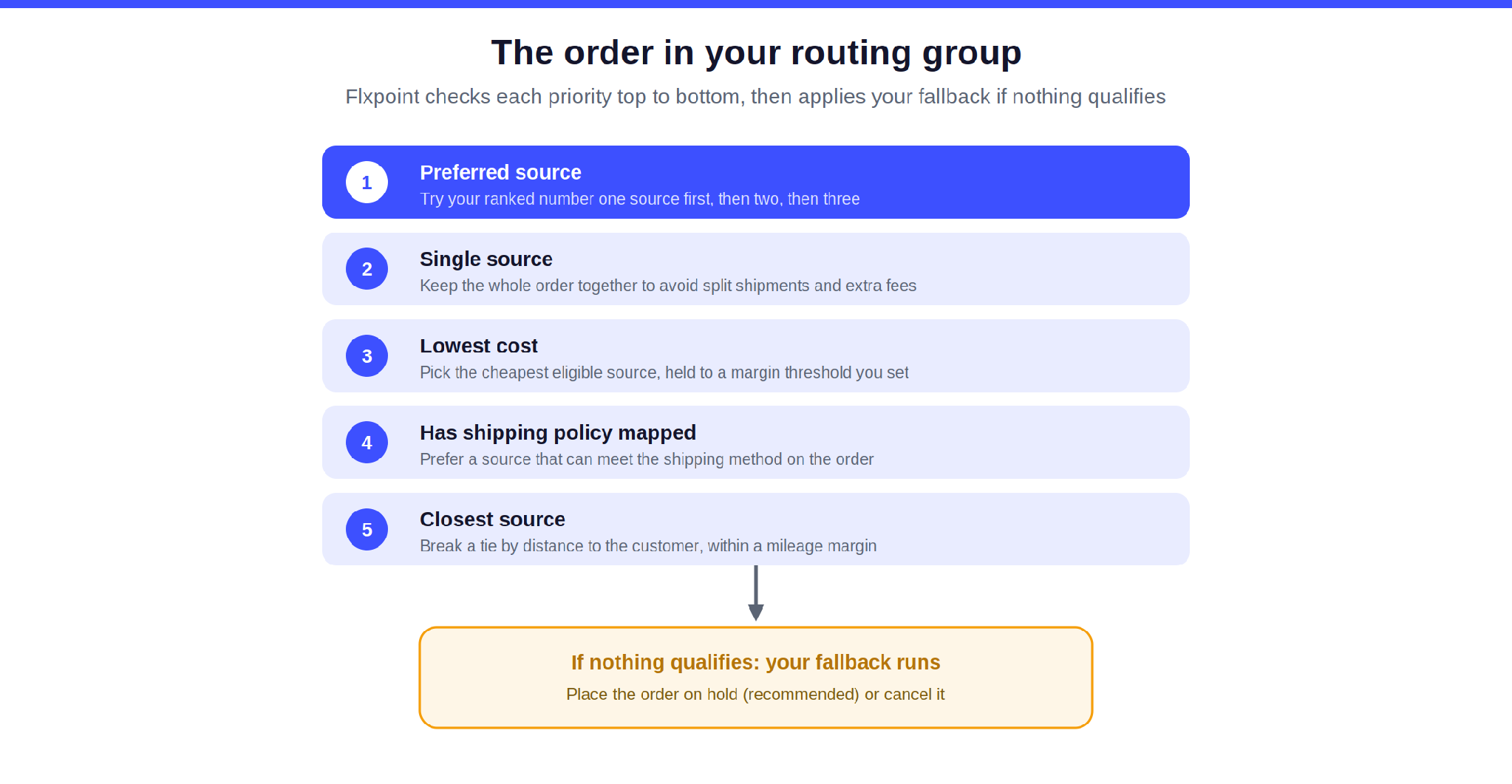
Figure 2: A routing group checks each priority top to bottom, then applies your fallback.
One setting trips up more dealers than any other. Nothing routes on its own unless Auto Process Fulfillment Requests is turned on. With it off, fulfillment requests sit in Processing status waiting for manual approval, which is the most common reason people think routing is broken.
And if an order cannot be routed at all, because no source is eligible or the item is out of stock, you pick the fallback: place the order on hold, which is recommended so you can fill it when inventory returns, or cancel it.
How Flxpoint routes firearm orders
On top of that general order routingl engine, Flxpoint adds a firearm-specific layer, because serialized products have to ship to a licensed FFL under federal rules. Four behaviors matter for routing.
It flags what is regulated
Flxpoint identifies items that require an FFL transfer so the right workflow kicks in automatically. That covers complete firearms, serialized components like AR-15 lower receivers, and restricted items that need extra approval such as suppressors. Identification comes from your Get Inventory mapping, whether a product type, an FFL Required field, or a firearm indicator, or from flipping the Requires FFL toggle on an inventory variant. That flag then becomes usable elsewhere in the rules engine.
It splits mixed carts automatically
When a cart holds both a firearm and a non-firearm item, Flxpoint splits the order. The firearm portion is held until FFL validation finishes, while the accessory portion processes and routes right away. This keeps a regulated item off the same track as unregulated goods, which is exactly how a 2A-friendly operation should run.
It treats FFL data as a hard gate
During fulfillment request generation, Flxpoint checks that the required FFL details are present: the license number, the receiving FFL holder's address, and contact details. Missing or invalid data blocks the firearm fulfillment request from moving forward until you complete it. You can also switch on a Contains Firearms hold to route every firearm order through manual compliance review first, trading some speed for a checkpoint." (the two sentences say the same thing.
It records and transmits FFL data, but you own compliance
Flxpoint captures the FFL dealer information and passes it to the distributor inside the standard order payload or EDI 850 purchase order. It does not verify FFL licenses or make legal determinations for you. Setting up routing so firearm SKUs only reach firearm-compliant distributors, and keeping your compliance checks current, stays your responsibility as the dealer.
FFL details can reach the order three ways: manual entry, automatic collection when the sales channel provides it, or the Master FFL app pushed in through a BigCommerce webhook. On GunBroker, Flxpoint can filter incoming orders by FFL status and will not let an order that requires an FFL be marked shipped until FFL Received is true.
Note: One honest point for anyone in this space, because the ATF holds the dealer responsible, not the software. Flxpoint does not verify FFL licenses or make legal compliance decisions for you. It records and transmits the FFL info as provided, flags regulated items, splits mixed orders, gates the firearm fulfillment request until data is present, and lets you build rules so regulated SKUs only reach capable vendors. Routing itself is not restricted by FFL status, so it is on you to configure eligibility correctly. That distinction is what makes the automation trustworthy rather than a false sense of safety.
Real routing scenarios for firearms and tactical dealers
Here is how the routing model above resolves the situations firearms dealers actually run into. All of these are configurable in the routing group and the rules engine.
Compliance-first routing on a mixed cart
A customer orders an AR-15 lower receiver plus a sling. The lower receiver is serialized and requires an FFL transfer. Flxpoint identifies the regulated line, splits the order, holds the receiver until the FFL details validate, and routes the sling to your best accessory source right away. The receiver only advances once the receiving FFL is attached. The customer gets their accessory quickly, and the serialized item never moves without its paperwork. Learn more on the FFL compliance page.
Lowest cost within a margin
A customer orders a Glock slide, a simple accessory with no FFL requirement. Two distributors carry it at close landed costs. With lower cost routing and a lowest-cost priority set to a small percentage margin, Flxpoint picks the cheaper landed option automatically. Multiply a couple of dollars saved across hundreds of orders a month and the margin gain is real, with no price cut required.
Single source to kill split-shipment fees
A customer buys five items that two distributors could both cover. Rank single source as a priority and Flxpoint favors keeping the order at one source instead of fanning it out. That is the exact savings Reuben Bakker pointed to, one shipping charge and one drop ship fee instead of three, since there are "significant savings right off the top by just shipping it more efficiently out of one source." It also means a cleaner unboxing for the customer who would otherwise wonder why only two of five items showed up.
Cascading fallback so nothing shows out of stock
A popular optic is out at your first source. With preferred source routing, Flxpoint cascades to your second source, then your third, until it finds stock. Your customer never sees an out-of-stock page when another distributor has the item. As Bakker put it, "it's really silly to have an out of stock page when we've got two or three other vendors that might also have that available."
Closest warehouse to cut transit and cost
For ammunition headed to a customer in the West, a Nevada source may beat a Texas source on both shipping cost and delivery time. Rank the closest priority within a mile margin and Flxpoint favors the nearer warehouse when other factors are close.
State and address rules that reflect real law
Carrier and address restrictions are their own routing problem. RSR, for example, declines ammo orders it cannot legally fill, forces FedEx Ground on ammunition, and blocks PO Box addresses. Your rules should route ammo to a source and an address that can actually accept it, and use advanced on-hold rules to catch restricted-state shipments and PO Box addresses before anything routes.
How to set up routing rules with no code
Routing lives in your Flxpoint dashboard, and setup is a business task, not a developer task. Here is the practical sequence.
Step 1: Rank your priorities
Decide what matters most for each group of orders. Compliance always comes first for firearms. After that, most dealers rank cost, then the ability to keep an order in one shipment, then speed and proximity. You arrange these in a routing group.
Step 2: Set your thresholds
Give the cost rule a boundary, such as route to the cheapest source unless it costs more than a set margin above the optimal one. Do the same for proximity with a mileage margin. Thresholds keep the engine from making a technically cheaper choice that hurts service.
Step 3: Isolate your FFL items
Turn on the Requires FFL flag for regulated variants and restrict those SKUs to distributors that can ship them. This is the single most important rule for a firearms dealer, and it is why compliance sits at the top of the ladder.
Step 4: Add advanced on-hold rules
Flxpoint's advanced on-hold rules let you auto-hold orders at import when your own conditions are met. You get up to five rules, each with up to five conditions, and you write separate rules for any either-or logic. Common firearm setups include holding shipments to restricted states with a rule like State In List Hawaii, Alaska, catching a possible fraud pattern like an order total over $1,000 combined with a PO Box address, and flagging a shipping name that does not match the billing name.
Step 5: Turn on automation, then watch it
Switch on Auto Process Fulfillment Requests so eligible orders route without a manual click. You can still override any single order in the interface when you need to. Review your routing decisions, watch shipping cost per order and fulfillment time, and adjust your priorities as distributor performance changes.
The math: what routing optimization does to your margin
The example below is illustrative, not a guarantee, but the shape holds up across real dealers.
Your online firearm store runs 1,000 orders a month across RSR, Lipsey's, and Davidson's, at a $200 average order value and a 20 percent gross margin, or $40 per order. Under manual routing, fulfillment, meaning shipping plus dropship fees, runs about $10 per order. Smarter source selection and fewer split shipments bring that down to about $8 per order.
|
Metric |
Manual routing |
Optimized routing |
|---|---|---|
|
Orders per month |
1,000 |
1,000 |
|
Fulfillment cost per order |
$10 |
$8 |
|
Monthly fulfillment cost |
$10,000 |
$8,000 |
|
Monthly gross profit |
$30,000 |
$32,000 |
That $2 per order is $2,000 a month, or about $24,000 a year, from routing decisions alone. It shows up as margin, not as a price cut, and the multi-line consolidation Bakker described stacks on top of it. Add in fewer compliance headaches and hours your operations team gets back, and the return usually lands well inside a quarter.
Common routing mistakes firearms dealers make
Routing by hand at scale
A person deciding every order is slow, subjective, and impossible to keep consistent past a few hundred orders. The fix is to move the logic into rules and let the engine apply them the same way every time.
Treating compliance as an afterthought
Assuming routing will handle FFL requirements on its own is the dangerous version, and the cost is legal risk, chargebacks, and account review. Make FFL status the first thing routing checks. Set up product identification and source eligibility so regulated items can only reach capable distributors, and add on-hold rules for restricted states and suspicious addresses. The platform gates and splits, but you have to configure the eligibility.
Optimizing for cost and nothing else
Always routing to the cheapest source backfires when that source ships late or cancels often. The hidden costs, returns, refunds, and lost customers, wipe out the saving. Cost belongs in the ranking, but a margin threshold and other priorities keep a two-dollar win from costing you the order.
Not monitoring source performance over time
Distributor stock levels, pricing, and reliability drift. Stale preferences mean you keep paying for a source that has quietly degraded. Review your routing priorities regularly and adjust as your vendor mix changes, and account for distributor quirks while you are in there. Lipsey's routes restricted brands down a dealer-token path and will not dropship restricted SKUs, so you keep an Approved Brands list.
Ignoring geography
Routing an order to a warehouse on the opposite coast raises shipping cost and slows delivery. Factor proximity into your rules with the closest-source priority within a mile margin, so a nearer source wins when other factors are close. For ammunition, this is also a compliance point: RSR forces FedEx Ground and blocks PO Box addresses, so route ammo only to a source and address that can accept it.
Flxpoint's routing versus manual and generic tools
Every approach here does something well. The question is which one understands multi-supplier firearms fulfillment end to end.
Manual routing in spreadsheets and ERP preferences. It is transparent and cheap to start, and it works at low volume. It does not scale, it is inconsistent across a team, and it cannot react to intraday stock and price changes. Flxpoint applies the same rules to every order and reacts to live data.
Generic integration platforms like Celigo or Pipe17 are capable connectors that can wire up almost any system.
But they are general-purpose, so anything firearm-specific is on you to design and maintain. Out of the box they have no concept of an FFL-required item, no automatic mixed-cart splitting, and no distributor-specific submission logic, so building compliant firearms routing on them means a heavy custom project and ongoing upkeep every time a distributor or a state rule changes.
Flxpoint ships that logic built for the firearms industry: it flags regulated items, splits mixed orders, gates the firearm fulfillment request until FFL data is present, and already speaks each distributor's ordering format.
Warehouse and shipping tools like ShipStation or ShipHero. These are strong at executing fulfillment once a source is chosen. They do not decide which distributor should get the order in the first place. Flxpoint's routing sits upstream of that step and hands off cleanly.
Flxpoint advantage: Routing logic upstream of WMS; integrated with your suppliers + sales channels
|
Feature |
Manual |
Generic iPaaS |
WMS |
Flxpoint |
|
Profit optimization |
❌ |
⚠️ Complex |
❌ |
✅ Built-in |
|
Compliance awareness |
❌ |
❌ |
❌ |
✅ Firearms-specific |
|
Supplier performance tracking |
⚠️ Manual |
❌ |
❌ |
✅ Real-time |
|
Scales to 10k+ orders/month |
❌ |
✅ |
✅ |
✅ |
|
Firearms supplier integrations |
❌ |
❌ |
❌ |
✅ 10+ firearms distributors |
Distributor-side routing is not uniform, and Flxpoint handles it
The detail most tools miss is that each firearms distributor accepts orders differently, and Flxpoint's integrations account for that.
Lipsey's routes each order by brand and item type across three paths. A restricted manufacturer goes to a dealer-token endpoint, a non-restricted firearm goes to the firearm drop ship endpoint, and a non-restricted non-firearm goes to standard drop ship. You maintain an Approved Brands list so restricted-brand orders do not fail, and restricted SKUs cannot be drop shipped at all.
RSR works over FTP with XML purchase order files, and it enforces ammunition rules directly. It declines ammo orders with Error 86 when the address cannot accept it, ammo cannot ship to a PO Box, and it forces FedEx Ground. The documented remedy is to use a physical street address or reroute to a different source.
On the channel side, GunBroker order import lets you filter by FFL status and enforces that an order requiring an FFL cannot be marked shipped until FFL Received is true. And from the distributor's own systems, the API help center describes sources polling for fulfillment requests, acknowledging them, and returning tracking, with FFL fields riding inside the standard payload. This is the underlying mechanism that makes multi-distributor firearms fulfillment work.
Implementation and support
Setting up routing does not require a developer. The Flxpoint team helps you define your priorities, connect your distributors by API, EDI, or file feed, and configure the rules that fit how you sell. That flexibility is exactly what PSA valued, the ability to choose how they integrate with each partner instead of being locked into one method, with everything managed under one roof.
You keep your suppliers already connected through the firearms distributor network, your compliance gates in place, and your priorities ranked to your business. Your team monitors the dashboards, and you adjust routing as you add vendors and categories. When you are ready to expand beyond core firearms into tactical, camping, and outdoor gear, the same routing model carries over to your tactical and outdoor supplier network.
Routing decides compliance and cost on every order. Configure it once and every order benefits.
See intelligent routing built for firearms dealers. Schedule a routing strategy call.
Frequently asked questions
How does Flxpoint route FFL items differently from regular items?
FFL items follow the same routing methods as everything else, preferred source or lowest cost, but Flxpoint adds firearm handling around them. It flags the regulated item, splits it off from any non-firearm items in the cart, and holds it until the required FFL details are present before the fulfillment request can move.
Can Flxpoint route a mixed cart with a firearm and accessories?
Yes. Flxpoint automatically splits the order. The accessory portion processes and routes right away, while the firearm portion waits for FFL validation. Your customer's non-regulated items are not held up by the compliance step.
Does Flxpoint verify FFL licenses for me?
No. Flxpoint records the FFL dealer information and transmits it to the distributor, but it does not verify licenses or make legal compliance decisions. Setting your rules so firearm SKUs only reach firearm-compliant sources, and keeping your own compliance current, remains your responsibility.
How do I stop a firearm order from routing to a non-FFL supplier?
Turn on the Requires FFL flag for those variants and restrict the SKUs to distributors that can ship them. Because compliance sits first in your routing group, any source that cannot handle the item is skipped automatically.
Can I hold orders going to restricted states?
Yes. With advanced on-hold rules you can hold shipments to specific states using a rule such as State In List Hawaii, Alaska, and tag the order for review before it routes anywhere.
How does Flxpoint handle ammunition routing?
Route ammunition to a source and address that can accept it. RSR, for example, declines ammo it cannot legally fill, forces FedEx Ground, and rejects PO Box addresses, so your rules should keep ammo off ineligible addresses and route it to a capable source.
Why are my orders not routing automatically?
The most common cause is that Auto Process Fulfillment Requests is turned off. With it off, fulfillment requests wait in Processing status for manual approval. Turn it on and eligible orders route on their own.
Can I override the automated routing on a single order?
Yes. You can manually reroute or reassign any order in the Flxpoint interface when a specific situation calls for it, without changing your standing rules.
Which firearms distributors does Flxpoint integrate with?
Flxpoint connects to major firearms and tactical distributors, including RSR Group, Lipsey's, Davidson's, Sports South, Chattanooga Shooting Supplies, Kinsey's, Bill Hicks, Zanders, and Rothco, over API, EDI, or file feeds.
Do buyers get tracking when a firearm ships to their FFL?
That depends on your sales channel and notifications, not on routing. Many dealers send the buyer tracking and let the receiving FFL know a transfer is coming, since some shops log incoming packages only at the end of the day. It is good practice to confirm the FFL details with the buyer before the item ships.
Turn routing into found margin
Most firearms dealers are leaving money on the table with manual or careless routing, and they are carrying more compliance risk than they need to. A short routing review will show you where your fulfillment costs are leaking and what the automated version could recover.
Book a demo with a firearms ecommerce specialist and bring your distributor list and priorities.
.png)