Some of the sharpest multi-vendor marketplaces online never touch a box. They pick a niche (hunting and fishing gear, home goods, tactical apparel), recruit the brands that serve it, and run a storefront where every product ships straight from the seller.
The marketplace owns the customer, the catalog and the checkout. The sellers own the inventory and the shipping.
On paper it's the lightest model in ecommerce: no warehouse, no stock risk, no pick-and-pack team. In practice the work moved somewhere else. It now lives in vendor data: stock counts, order handoffs, tracking numbers and product records.
This post walks through how that model runs, where it strains as the seller count climbs, and why the speed at which you onboard a new vendor ends up setting how fast the whole marketplace grows.
How the hands-off multi-vendor marketplace runs
Most niche marketplaces on this model write the same operating rules into their seller terms. The details shift from one to the next, but the split of work looks like this.
| Area | Marketplace does | Seller does |
|---|---|---|
| Inventory and shipping | Never holds, stores or ships product | Stores, packs and ships every order |
| Order handoff | Sends the order by email, tracks it in a merchant portal | Confirms the order and types tracking into the portal |
| Shipping options | Charges a flat rate at checkout | Picks which shipping methods it offers |
| Payouts | Holds funds until delivery is confirmed, then releases them a few days later | Withdraws once funds clear |
| Returns and disputes | Helps fight chargebacks | Owns refunds and return decisions |
| Catalog | Runs a shared product database and approves every new product | Matches to existing records or submits new ones |
| Stock levels | Offers to manage stock under a separate agreement | Keeps its own counts current |
The appeal sits in the middle column. It's short: the marketplace sells and the sellers do the rest. The catch is that four of those seven rows depend on a seller doing something by hand, on time, every time.
Where the multi-vendor marketplace model cracks at scale
Each rule works with twenty sellers, and each one fails in its own way at two hundred.
Orders handed off by email. An order lands in a shared inbox at a five-person brand. Someone confirms it Tuesday morning instead of Monday afternoon. Spread that across every seller and ship times vary by days, and the customer blames the storefront, not the brand.
Tracking typed into a portal. Payouts wait on confirmed delivery, so a missing or mistyped tracking number hurts twice. The customer gets no shipping update and the seller doesn't get paid. Both become support tickets for the marketplace.
Flat-rate shipping with seller-picked methods. The customer pays one price and the seller ships however it chose. When a seller sends a heavy item by slow ground from a far warehouse, the delivery date drifts and the marketplace has no lever to pull.
Seller-owned refunds, marketplace-backed chargebacks. Chargeback defense runs on proof: ship date, tracking number, delivery confirmation. If that proof sits only in the seller's own system, the marketplace chases it while the dispute clock runs.
A shared catalog with an approval gate. A central database of hundreds of thousands of products keeps listings clean. But every product a new seller brings that isn't already in it needs mapping and review. Hand-check a few thousand SKUs from one brand and that brand waits weeks to make its first sale.
Stock kept current by the seller. This one hurts most. Counts get updated when someone remembers. Meanwhile the storefront keeps selling an item that sold out on the brand's own site last night, and the cancellation email loses the customer.
The usual fix is a managed-stock agreement where the marketplace takes over the feed. That works for five sellers. For fifty sellers sending fifty file formats, it becomes a full-time job.
Vendor onboarding speed is the multi-vendor marketplace growth lever
A niche multi-vendor marketplace sells shoppers one thing: deep selection inside a category they care about. Every seller who has signed but isn't live yet is selection you've paid to recruit and can't sell. Three costs pile up while that vendor waits.
The recruiting money is already spent. Sales calls, contracts and approval happened, and revenue hasn't. Then there's reputation. Sellers judge a marketplace by their first month, and a brand that spends six weeks fighting a CSV template before its first order tells other brands. In a small niche, the brands all know each other.
The third cost is a ceiling. If each new vendor takes someone on your team a week of mapping and cleanup, the catalog grows only as fast as you hire, and recruiting harder doesn't move it.
The number worth watching
Vendors live per month: sellers with accurate stock and a working order handoff, actually selling. Signed contracts don't count. We've written more about why onboarding speed drives marketplace growth if you want the longer case.
What changes when vendor data moves on its own in a multi-vendor marketplace
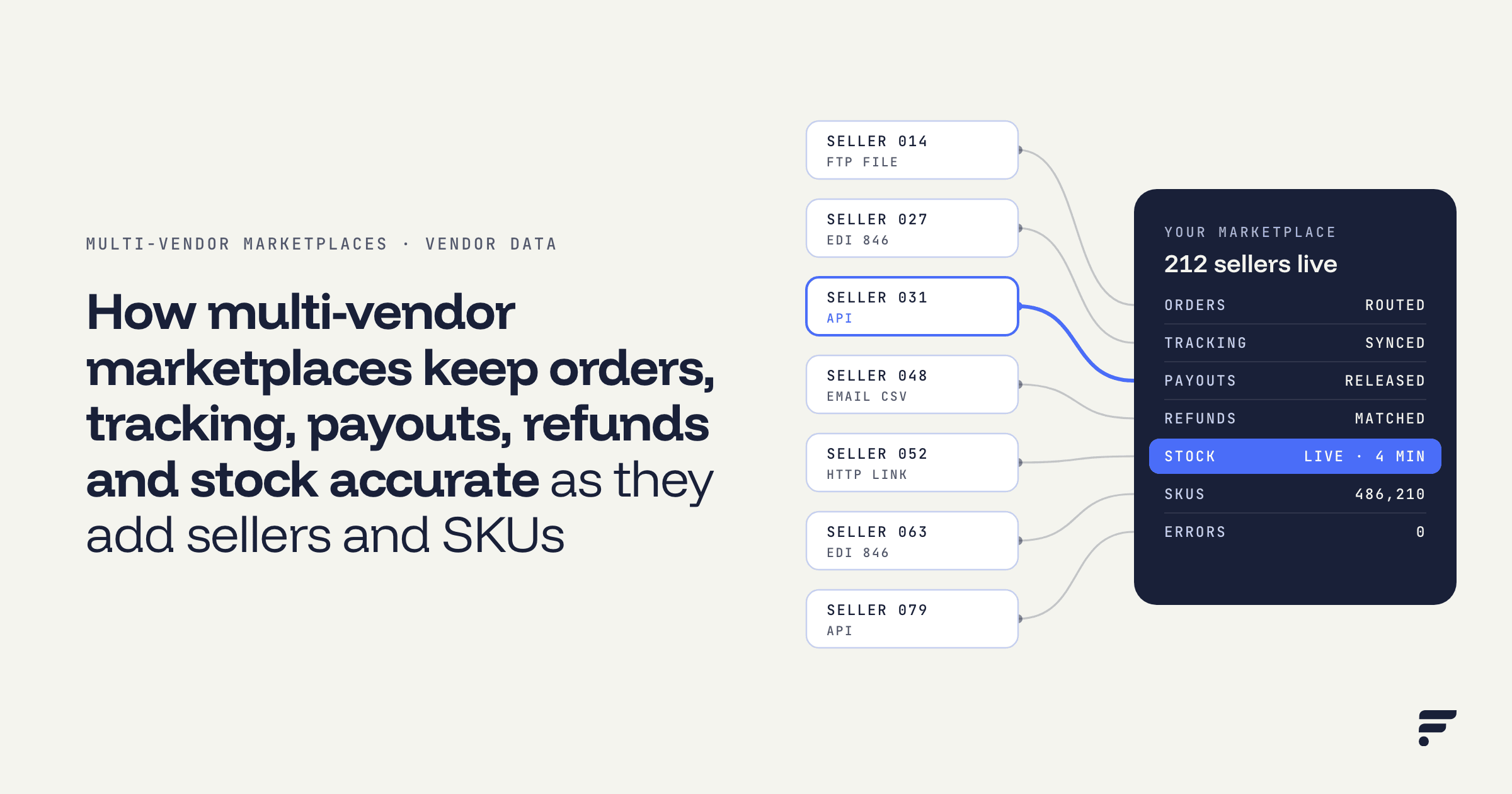
Flxpoint sits between your storefront and your vendors. Each vendor connects as a source in whatever format it already sends: an FTP flat file, an EDI 846, an API, an email attachment or an HTTP link. You map the connection once, and it runs on a schedule after that.
VENDOR FEED FTP, EDI, API, email or HTTP, in the vendor's own format | → | SOURCE INVENTORY Products land in a holding area for review | → | MASTER CATALOG SKUs map to records you already sell | → | STOREFRONT Accurate stock, orders out, tracking back |
Here's what that does to each weak point above.
Stock stays current without the seller remembering Get Inventory (Primary) imports the vendor's full catalog. A lighter Get Inventory (Secondary) feed refreshes quantity and price between full runs. Managed stock stops being a favor your ops team does for a few big sellers and becomes the default for any vendor with a feed. |
New vendors land in a holding area before they list Imported products appear in Source Inventory first, where your team checks the data before anything goes live. When a vendor carries a product you already sell, map its SKU to the existing Master Catalog SKU and Flxpoint pools the quantities or applies your routing priorities. The approval gate stays, but the work behind it shrinks to checking a mapping instead of retyping a spreadsheet. |
Orders leave without an inbox When an order routes to a vendor, Flxpoint sends the fulfillment request automatically. If more than one vendor carries the item, orders can route by stock, price or location. |
Tracking comes back by itself Get Shipments pulls tracking from the vendor and syncs it to the channel the order came from. That's the same data delivery-based payouts and chargeback defense depend on, captured without anyone typing it. |
Vendors without IT teams still connect Plenty of good brands will never build an integration. Flxpoint has pre-built integrations for common suppliers, and its team can build the connection for vendors that need one. |
For the wider view of which marketplace workflows to automate, from inventory sync to order routing, read how to automate multi-vendor marketplace operations.
One tip from Flxpoint's source setup guide
Before you build a new vendor's catalog and listings, confirm their connection can receive orders and send back shipments. Finding out afterward means redoing the work.
A multi-vendor marketplace checklist for your next vendor
Before your next vendor goes live
Tick each one off as you go.
Keep multi-vendor marketplace data as light as the model
The no-warehouse marketplace is a good business. It lets a small team run a big catalog in a niche it knows well. But it stays light only if vendor data moves without people carrying it. Otherwise your ops team ends up as the warehouse, stacked with spreadsheets and order emails instead of boxes.
Bring your vendor list.
If you run a marketplace like this, book a Flxpoint demo and we'll show you how each vendor would connect.
Book a Flxpoint demo