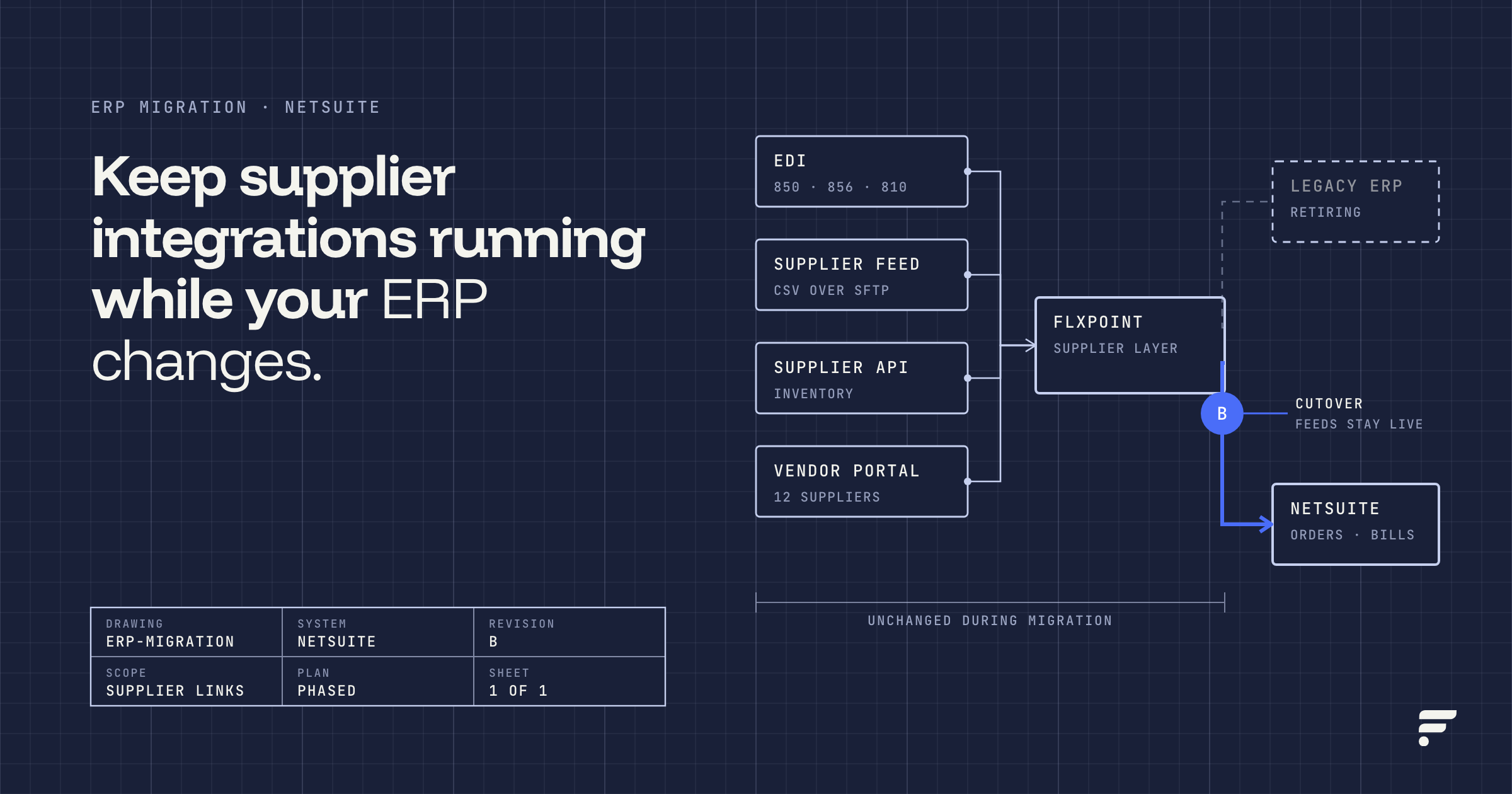
To keep supplier and dropship integrations running during an ERP or NetSuite migration, inventory every supplier connection first, freeze changes to those connections during the project, run the old and new systems in parallel against real orders, and cut over only after purchase orders, inventory feeds, and tracking reconcile line by line. One way to reduce rebuild work is to keep supplier connections (feeds, EDI, APIs, and order routing) in a supplier-integration layer that sits outside the ERP, so the ERP is one connection to that layer rather than the hub every supplier is wired into. Flxpoint is one example of that layer: suppliers connect to Flxpoint, and Flxpoint connects to NetSuite or another accounting system.
This guide covers what usually breaks, the three common approaches and their trade-offs, a phased migration plan, a data mapping table, and a testing and cutover checklist you can adapt.
Why do supplier integrations break during an ERP migration?
Most supplier integrations are built directly against the ERP that existed when they were set up. The EDI maps reference the old item numbers, the inventory feeds write into the old item master, and the purchase order logic lives in the old system’s workflows or custom scripts. When the ERP changes, every one of those dependencies has to be found, rebuilt, and retested, usually while orders keep flowing.
The problem is rarely one big failure. It is a long list of small mismatches that each stop a handful of orders, and they tend to surface in the first week after go-live when the team is already stretched.
What specifically breaks?
- EDI maps. Purchase orders (850), acknowledgements (855), ship notices (856), invoices (810), and inventory advice (846) are mapped to the old ERP’s fields. A new ERP means new field names, new internal IDs, and often a new EDI translator, so each trading partner may need retesting.
- Item masters. The new ERP usually gets a cleaned-up item master. If SKUs, internal IDs, or matrix item structures change, every supplier SKU crosswalk built on the old IDs stops matching.
- Purchase order flows. Dropship POs created from sales orders, PO numbering, approval steps, and vendor-specific PO formats are often configured or scripted in the ERP itself and do not migrate automatically.
- Vendor portals and file drops. Suppliers who pull POs from an SFTP folder or post invoices to a portal are pointed at paths, credentials, and file layouts tied to the old system.
- Inventory feeds. Supplier stock files and API feeds that updated the old ERP need a new destination and a new SKU match. Until they do, channels can show stale quantities and oversell.
- Order routing logic. Rules like “send to the cheapest in-stock vendor” or “ship from our warehouse first” are frequently encoded as preferred-vendor settings, saved searches, or scripts in the old ERP. They are easy to forget and hard to rebuild exactly.
- Tracking and invoice return paths. Ship confirmations and vendor invoices have to land on the right sales order and purchase order in the new system, or fulfillment and accounts payable fall out of sync.
What are the options for handling supplier integrations in a migration?
There are three common approaches. None is right for every business, so the honest comparison is about where the supplier logic lives and who maintains it afterward.
| Approach | How it works | Best for | Trade-offs |
|---|---|---|---|
| Rebuild every supplier integration inside the new ERP | Each EDI partner, feed, and PO flow is re-created against the new ERP, usually by the implementation partner or an EDI provider. | Businesses with a few stable suppliers and strong in-house ERP resources. | Most direct, but every supplier is retested at once, and the next ERP change repeats the work. Supplier logic ends up spread across scripts and settings. |
| Use a general-purpose iPaaS | An integration platform moves data between the ERP, channels, and suppliers using flows you or a partner build. | Teams with integration developers who need to connect many kinds of systems, not only suppliers. | Flexible and reusable, but supplier-specific logic (routing, SKU crosswalks, vendor file formats) still has to be designed and maintained as custom flows. |
| Keep a supplier-integration layer outside the ERP | Suppliers, feeds, EDI, and routing connect to a dedicated platform. The ERP receives orders, fulfillments, and bills through one connection. | Retailers, distributors, and brands with many dropship vendors or frequent supplier changes. | Adds a platform to manage and pay for, and the ERP connection itself still has to be configured, mapped, and tested for the new system. Supplier connections are configured in the layer rather than in the ERP, so the ERP change mainly affects the layer-to-ERP connection and the identifiers it maps, but confirm with your provider what, if anything, each supplier needs to change. |
How does a supplier-integration layer reduce rebuilds?
The idea is separation. Supplier connections can be managed independently from the ERP or accounting connection in Flxpoint. When you replace the ERP, you can potentially retain existing supplier integrations and focus much of the reconfiguration on the new ERP connection and its associated mappings. However, this depends on how the existing setup is configured. Changes to product identifiers, vendor associations, locations, or workflows may also be necessary. See Flxpoint’s NetSuite integration overview, NetSuite accounting guide, and QuickBooks Online accounting guide for details on these integration and mapping requirements.
Flxpoint follows this pattern. Its NetSuite page describes the integration as running alongside your supplier connections and routing rules, and its NetSuite dropship page notes that vendor connections are handled separately by Flxpoint. Suppliers can connect through EDI, API, scheduled CSV or XML file feeds, a vendor portal, or directly from the vendor’s own Shopify, BigCommerce, or Magento store.
On the EDI side, Flxpoint publishes its own X12 EDI specifications, with 004010VICS as the preferred version. It also accepts 004010 and 005010. Files are exchanged over SFTP or FTPS, and supported documents include inventory advice (846), purchase orders (850), purchase order acknowledgements (855), advance ship notices (856), and invoices (810). Each document has specific formatting and mapping requirements, and Flxpoint does not support AS2. Confirm any VAN connectivity requirements with Flxpoint before onboarding suppliers.
On the ERP side, Flxpoint connects to NetSuite over its REST web services using token-based authentication. Oracle has announced that, starting with NetSuite 2027.1, new integrations can no longer be created with token-based authentication, so if your NetSuite go-live falls after that release, confirm the authentication method with Flxpoint during planning.
As an accounting connection, Flxpoint can create NetSuite sales orders, purchase orders for dropship routes, item fulfillments with tracking, and vendor bills from supplier invoices. NetSuite can also act as a channel or source, allowing Flxpoint to pull sales or purchase orders from NetSuite, sync item quantities and prices, and send shipment data back. Flxpoint also offers a QuickBooks Online accounting integration and supports other ERP and accounting integrations, which may be relevant if you are moving from another system to NetSuite.
Where this is not the right fit: if you have two or three suppliers on a single stable EDI connection and no dropship routing, rebuilding inside the new ERP may be simpler than adding another platform.
What does a phased migration plan look like?
Treat supplier integrations as their own workstream in the ERP project, with a named owner, rather than a line item under “integrations.” The five phases below work whether you rebuild, use an iPaaS, or keep a separate supplier layer.
Phase 1: Inventory every supplier connection
List every supplier and every data flow, including the ones nobody remembers setting up. For each, record the connection type (EDI, API, SFTP file, email, portal), the documents exchanged, frequency, the fields used, and who at the supplier owns it.
- Pull a list of all active vendors with orders in the last 12 months.
- Export EDI partner profiles and document sets from your current translator.
- Find saved searches, scripts, workflows, and scheduled jobs in the old ERP that touch vendors, POs, or inventory.
- Document routing rules in plain language (“Vendor A first if in stock, else Vendor B, else warehouse”).
- Note supplier contacts and how much lead time each needs to test a change.
Phase 2: Freeze supplier changes
Set a freeze window for onboarding new suppliers and changing existing maps. Every change made during the migration has to be made twice, and changes made in a hurry are the ones that get missed.
- Announce the freeze dates internally and to key suppliers.
- Allow exceptions only through a documented change request.
- If you are moving supplier connections into an external layer, do it before the freeze so they are stable before ERP cutover.
Phase 3: Parallel run
Run real orders through both the old path and the new path, then compare outputs. Use a sandbox where you can. Flxpoint uses separate credentials for NetSuite Sandbox and Production environments. Each environment requires its own connection configuration and credentials, allowing you to test orders, purchase orders, shipments, and bills without affecting live production records
- Pick a representative sample: single-vendor, multi-vendor, split shipment, backorder, kit or bundle, and cancellation.
- Compare POs, ship notices, tracking, and vendor bills between systems line by line.
- Log every mismatch with a cause and a fix owner.
Phase 4: Cutover
Choose a low-volume window and decide in advance what happens to orders that are in flight.
- Set a hard cutoff time for new orders entering the old ERP.
- Decide whether open POs are closed out in the old system or migrated as open records.
- Switch the ERP connection, then confirm the first orders flow end to end before reopening volume.
- Keep the old system read-only and available for lookups.
Phase 5: Validate and stabilize
Plan for a hypercare period after go-live with daily checks rather than assuming the parallel run caught everything.
- Reconcile orders, POs, shipments, and vendor bills daily for the first weeks.
- Watch inventory accuracy on your top-selling SKUs across every channel.
- Review integration error logs every day and assign each error.
- Lift the supplier freeze only after error rates are back to normal.
What data needs to be mapped between the old and new systems?
Most post-migration supplier problems trace back to an identifier that changed without a crosswalk. Build a mapping table for each of these before the parallel run starts.
| Data element | What to map | Common failure | How to check |
|---|---|---|---|
| SKUs and item IDs | Your master SKU, each vendor’s SKU, channel SKUs, UPC or manufacturer part number, and the new ERP’s internal item ID | Orders reach the ERP with an item it cannot find, or a vendor receives your SKU instead of theirs | Run every active SKU through the crosswalk and flag blanks and duplicates |
| Vendor IDs | Old vendor record ID to new vendor record ID, plus EDI partner IDs | POs or bills attach to the wrong vendor or fail to post | Match on a stable field such as tax ID or EDI ID, not vendor name |
| PO numbering | PO number format and prefix, and the link between each PO line and its sales order line | Suppliers reject duplicate PO numbers, or shipments cannot be matched back to the sales order | Start new PO numbers in a range that cannot collide with old ones |
| Ship methods and carriers | Your ship method codes to each supplier’s carrier and service codes | Vendors ship the wrong service level, or tracking fails to post | Test one order per ship method per vendor |
| Units of measure | Each, case, pack, and conversion factors per item and vendor | A vendor sells by the case while your channel sells each, so quantities or costs are off by a multiple | Compare extended cost on test POs against vendor price lists |
| Locations and subsidiaries | Warehouses, dropship locations, and (in NetSuite OneWorld) subsidiaries | Fulfillments or bills fail validation for a missing or invalid location | Post one fulfillment and one bill per location in the sandbox |
| Customers and terms | Customer matching rules, payment terms, tax codes, and currency | Duplicate customers or posting errors on tax and currency | Review a sample of created records before turning on schedules |
Two NetSuite-specific details are worth knowing. First, decide whether NetSuite should see your ordered SKU or the vendor’s SKU on dropship lines. Flxpoint’s NetSuite accounting integration supports two SKU options: order-level SKUs and PO-level vendor SKUs. Order-level SKUs retain the SKU from the original customer order, while PO-level SKUs allow supplier-specific SKUs on dropship purchase orders. Choose the appropriate option in the Send Accounting Orders mapping template. If NetSuite uses a custom transaction column to link purchase order lines to sales order items, configure Flxpoint’s PO Item Association Key to match that column.”
What should be on the testing and cutover checklist?
Use this as a starting point and add rows for your own suppliers and channels.
Before cutover
- Every active supplier has a documented connection type, owner, and test contact.
- SKU, vendor, ship method, and unit of measure crosswalks are complete with no blanks.
- New ERP integration user, role, and permissions are set up, with separate sandbox and production credentials.
- Each EDI partner has passed a test cycle for every document type you exchange.
- Inventory feeds from each supplier update the correct items in the test environment.
- Routing rules produce the same vendor selection as the old system for a sample of orders.
- Tracking from at least one shipment per supplier posts back to the sales order and to the channel.
- Vendor invoices create bills that match the PO, with correct terms and costs.
- A rollback plan exists, with a named person who can make the call.
Cutover day
- Pause scheduled jobs on the old path before enabling them on the new one.
- Confirm open orders and open POs are either closed out or carried over as planned.
- Process a small first batch of live orders and trace each one end to end.
- Notify suppliers whose connection details (paths, credentials, partner IDs) changed.
First 30 days
- Daily reconciliation of orders, POs, shipments, and bills.
- Daily review of integration errors, with each one assigned and closed.
- Spot checks of channel inventory against supplier feeds for top SKUs.
- A short supplier check-in after the first week to catch issues they see before you do.
One NetSuite sequencing detail can look like a bug during testing: in Flxpoint’s NetSuite integration, a vendor bill can be created only after the related purchase order reaches Pending Bill status. This generally occurs after the shipment or item receipt is recorded in NetSuite. If a vendor bill fails to sync, check whether the shipment operation ran first and whether the Create Shipments on Purchase Order setting is enabled in Flxpoint’s accounting settings. NetSuite’s Bill in Advance of Receipt preference can affect this behavior, so verify your account configuration.
Frequently asked questions
We’re switching ERPs. How do we keep our supplier and dropship integrations working?
Inventory every supplier connection, freeze changes during the project, run old and new systems in parallel on real orders, and cut over after reconciliation passes. The fewer supplier connections that depend directly on the ERP, the less you have to rebuild, which is why some dropship-heavy businesses keep supplier connections in a separate integration layer.
Can we migrate to NetSuite without breaking EDI with our vendors?
Yes, but test each EDI trading partner before cutover. If your EDI connections run through an integration layer outside the ERP, you may be able to retain those connections while reconfiguring the ERP integration. You must still validate purchase orders, item identifiers, shipping methods, and other dependent mappings. Confirm the communication methods supported by your integration provider and each trading partner.
Should we rebuild supplier integrations in NetSuite or keep them outside?
Rebuilding inside NetSuite can make sense if you have a few stable suppliers and in-house NetSuite developers. Keeping supplier connections outside the ERP tends to suit businesses with many dropship vendors, frequent supplier changes, or multiple sales channels. This approach can reduce the need for ERP customization when supplier requirements change, although updates to mappings, identifiers, or workflows may still be necessary.
Does Flxpoint replace NetSuite?
No. Flxpoint complements NetSuite rather than replacing it. NetSuite can continue to handle your ERP and accounting workflows, while Flxpoint manages supplier connections, inventory feeds, and order routing. Through its NetSuite accounting integration, Flxpoint can create sales orders, item fulfillments, and vendor bills, along with purchase orders for dropship routes, depending on your configuration.
What is the biggest cause of problems after go-live?
Identifier mismatches. A SKU, vendor ID, location, or PO line link that changed without a complete crosswalk causes orders, fulfillments, or bills to fail quietly. Building and testing the mapping table before the parallel run prevents most of these.
How long should the parallel run last?
Long enough to cover every order scenario you care about, including split shipments, backorders, cancellations, and returns, and at least one full vendor invoicing cycle. The right length depends on your order volume and how many suppliers you have.
Do we need to tell our suppliers about the migration?
Tell any supplier whose connection details, PO format, or contact will change, and give them time to test. If suppliers connect to an external integration layer that is not changing, their connection details may stay the same, but confirm this with your integration provider and give every supplier a heads-up in case PO numbering, SKUs, or ship methods change.
Can we use a NetSuite sandbox to test supplier flows?
Yes. Test orders, POs, fulfillments, and bills in a sandbox first. In Flxpoint, NetSuite Sandbox and Production use separate credentials, and NetSuite sandboxes are taken offline for periodic maintenance such as NetSuite version upgrades, so plan test runs around them. A sandbox refresh also replaces sandbox data with a copy of production, so avoid refreshing in the middle of a test cycle.
Plan the supplier side before the ERP goes live
ERP projects tend to focus on financials and the item master, while supplier connections get handled late. Starting with a full supplier inventory and a mapping table, and deciding early where supplier logic should live, keeps dropship orders moving through the change. If you want to see how a supplier-integration layer would sit alongside NetSuite or your next ERP, talk to the Flxpoint team with your vendor list and current setup.