.png?width=2240&height=1260&name=Office%20Supplies%20Inventory%20Management%20(10).png)
Table of Contents
- What is Flxpoint MCP?
- What makes Flxpoint MCP different from using an API?
- How to connect Flxpoint MCP to Claude
- What Flxpoint MCP can actually access
- What you can ask it from Flxpoint's MCP
- Conclusion
- Ready to Put Flxpoint MCP to Work?
Introduction
Now, Flxpoint MCP connects your Flxpoint account directly to Claude, so you can ask questions about your orders, purchase orders, shipments, invoices, routing, and more in plain English.
Claude pulls the relevant data from your account, understands Flxpoint-specific terminology, and gives you an answer you can actually work with.
And that's only the first version.
Currently, V1 is read-only, scoped to your own Flxpoint account, and available as a free beta. It already gives you a new way to troubleshoot your account, build custom reports, analyze suppliers, investigate late shipments, and build automations around the data you're already managing in Flxpoint.
This guide walks you through how to automate your business with Flxpoint MCP and the practical workflows you can build with it.
What is Flxpoint MCP?
MCP stands for Model Context Protocol.
The simplest way to think about it is as a standard way for Claude to securely connect to your Flxpoint data and use that data through a set of tools.
Instead of Claude having to figure out Flxpoint's API structure, endpoints, and custom logic every time, the MCP gives Claude the context it needs to work with Flxpoint data more efficiently.
You connect Flxpoint MCP to Claude, and Claude can then work with the live operational data available in your Flxpoint account.
You don't need to learn a new interface or build a custom reporting system. You just ask.
For example:
"Give me an overview of my Flxpoint account."
Or:
"Which sources have the most late shipments against their SLA?"
Or:
"Break down my PO cancellation rate by source."
Or:
"Why did this order not route?"
Claude can pull the relevant information and analyze it for you.
And because the MCP includes context about how Flxpoint works, Claude can understand things like the difference between a voided PO and a canceled PO instead of treating them as the same thing.
That's the important part.
What makes Flxpoint MCP different from using an API?
Some of our customers already connect AI systems to Flxpoint through our API, so it's fair to ask what MCP adds.
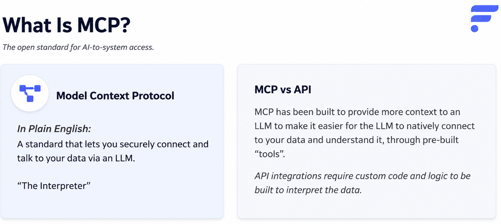
An API gives you the building blocks. MCP gives an AI a structured way to understand and use those building blocks. With a typical API integration, you or your development team have to understand our endpoints, work out what each one means, and write custom logic every time you build something new.
We think of MCP as an interpreter that passes the right context and tools directly to the LLM.
With Flxpoint MCP, Claude already has that context. It knows the tools available to it, it knows our terminology, and it can use those tools to answer questions about the operational data in your account. That's why you can type something as simple as:
"Why is this order on hold?"
Instead of figuring out which API endpoint contains the relevant information first, you can ask Claude directly and let Flxpoint MCP handle the connection to your data.
How to connect Flxpoint MCP to Claude
Getting started is straightforward.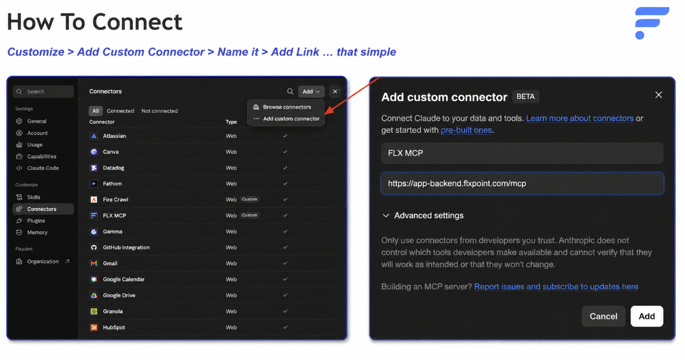
Step one: Open Claude
Go to Claude and open the connector settings.
Step two: Add Flxpoint as a custom connector
Go to:
Customize → Connectors → Add custom connector
Use the Flxpoint MCP endpoint provided for the beta: https://app-backend.flxpoint.com/mcp
Step three: Connect your Flxpoint account
Once connected, Claude can access the Flxpoint data available to your account.
The connection is scoped to your existing permissions, so Claude doesn't get access to another account or to data you couldn't already see yourself.
Step four: Allow the read actions
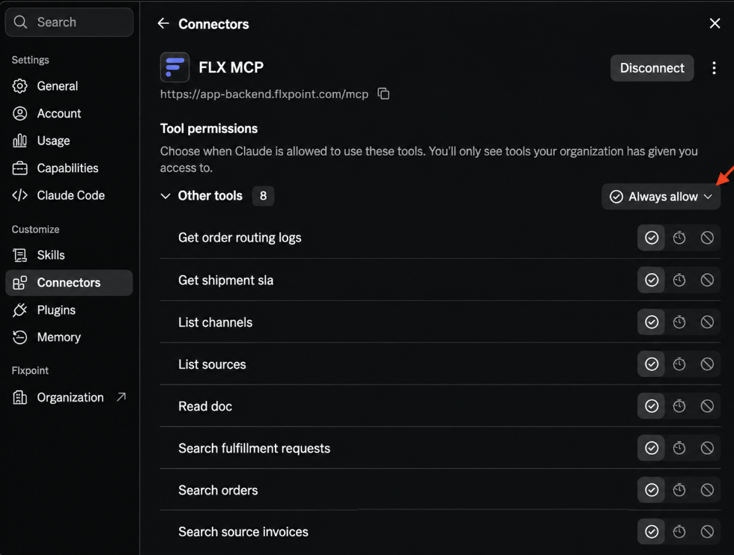
Flxpoint MCP V1 is read-only. When Claude asks for permission to perform the available read actions, we recommend allowing them so you're not approving the same actions over and over.
That's it. You can now start asking questions about your Flxpoint account.
What Flxpoint MCP can actually access
Flxpoint MCP V1 gives you a focused, read-only way to work with your account data through Claude.
Because this is our first version of MCP, we’re starting with a defined scope focused on the operational data you need to understand your orders and fulfillment workflows. You can use MCP to search and analyze information related to:
- Orders
- Purchase orders
- Fulfillment requests
- Shipments
- Invoices
- Order routing logs
- Shipment SLAs
- Channels
- Sources
- Flxpoint-specific terminology and context
You can ask Claude to search this data, find patterns, investigate issues, and explain what’s happening in your Flxpoint account.
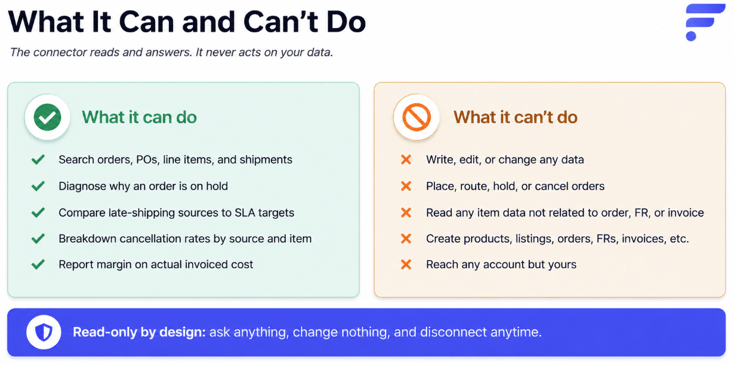
A simple way to think about the V1 scope is:
If the information is part of an order, purchase order, fulfillment request, invoice, or shipment, you can likely access it through MCP.
There are also some areas we haven't included in V1 yet. For example, inventory items, listings, and product data aren't currently available through the MCP connection.
What you can ask it from Flxpoint's MCP
The easiest way to understand Flxpoint MCP is to look at the questions it can answer.
You do not need to know which field to search, which status to filter, or which Flxpoint screen contains the information. Ask the operational question in plain English, and MCP can use the relevant Flxpoint data to find the answer.
For example:
Try:
“Find my orders that are currently on hold and tell me why.”
Or:
“Which suppliers have the most late shipments against their SLA?”
“Show me my PO cancellation rate by source.”
“Build a vendor scorecard based on supplier performance.”
These questions fall into six main workflows.
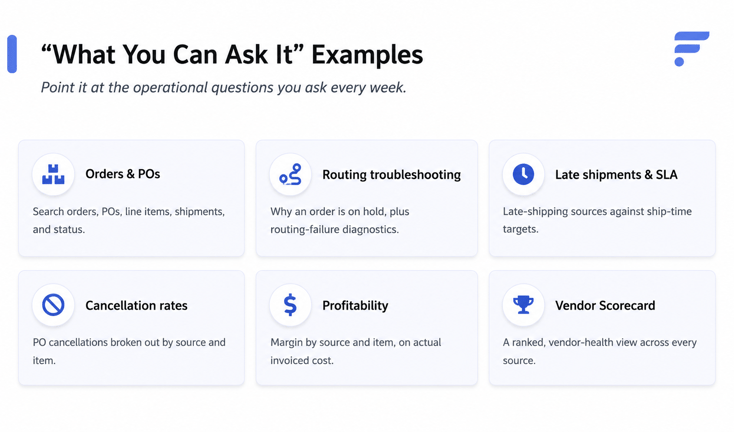
The important part is that these are not generic AI questions. MCP is working with the operational data and terminology inside your Flxpoint account.
Orders and POs
This is the biggest bucket, and the one you'll probably use the most. Claude can search your orders, POs, line items, shipments, and their current status, all without you opening a single screen in Flxpoint first.
On the order side, here's what Claude can find and explain in plain English:
- An order that's stuck or sitting on hold
- An order that can't find a shipping method
- An order that failed outright
- An order that never synced to your accounting or ERP system
- A shipment that never notified the sales channel it shipped, which happens a lot when a supplier ships under a different SKU
- Canceled or partially canceled line items
- Orders or POs that haven't shipped within the expected timeframe or SLA
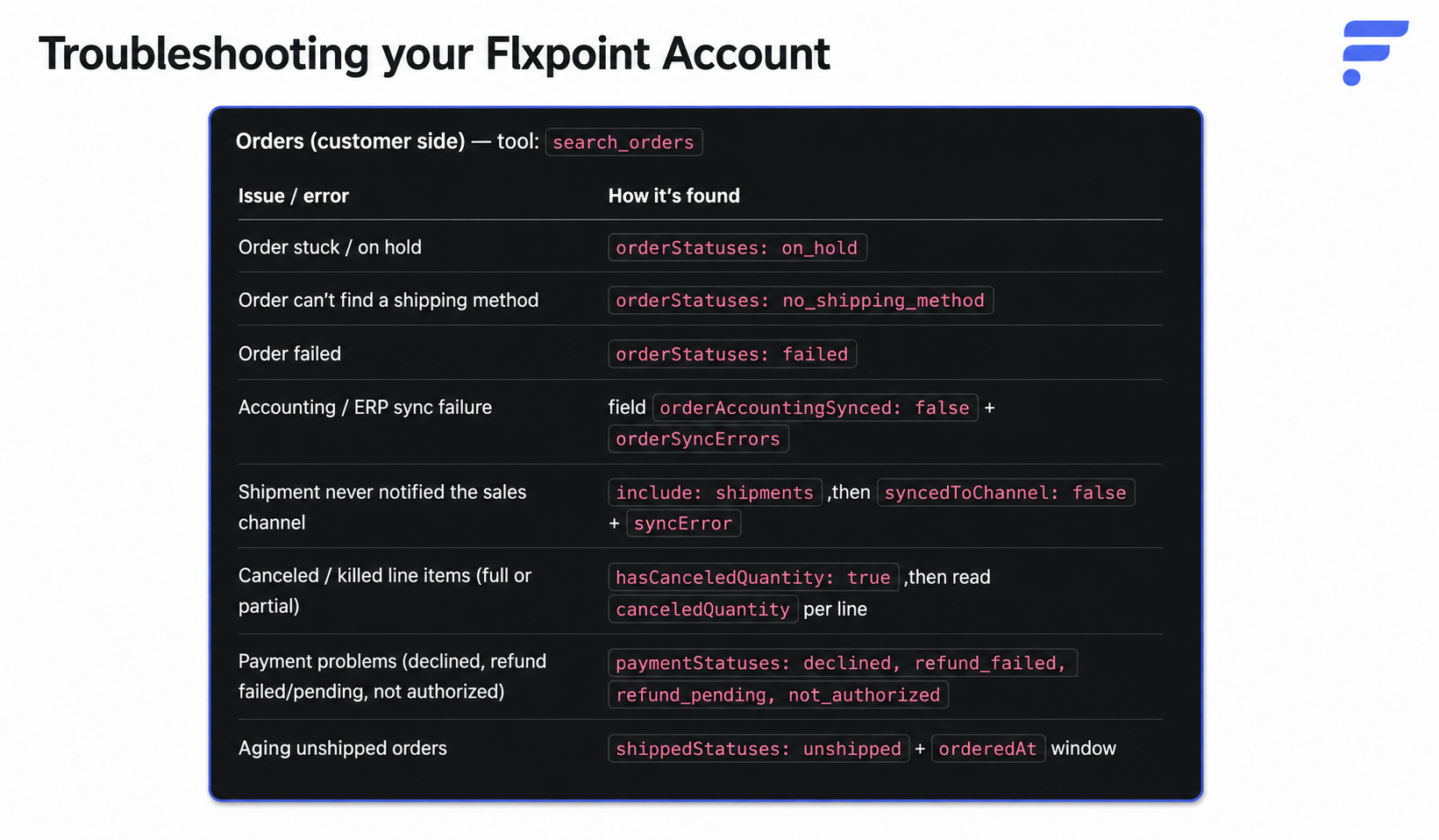
These are some of the order issues Claude can investigate through the MCP
You don't need to know any of those field names. You just ask the plain-English version:
"Find the orders in my Flxpoint account that are currently on hold and explain why they're on hold."
Or:
"Find orders that failed to sync to my accounting system and summarize the issue."
On the supplier side, the same idea applies to your POs and fulfillment requests:
- A PO stuck with a processing error
- A supplier asking for more information before they'll ship
- A PO number that's too long for a supplier's system to accept
- A duplicate PO or fulfillment request
- A full or partial supplier cancellation
- A voided PO
- A firearm PO that's missing required FFL information
- A PO that hasn't shipped within the expected timeframe or SLA.
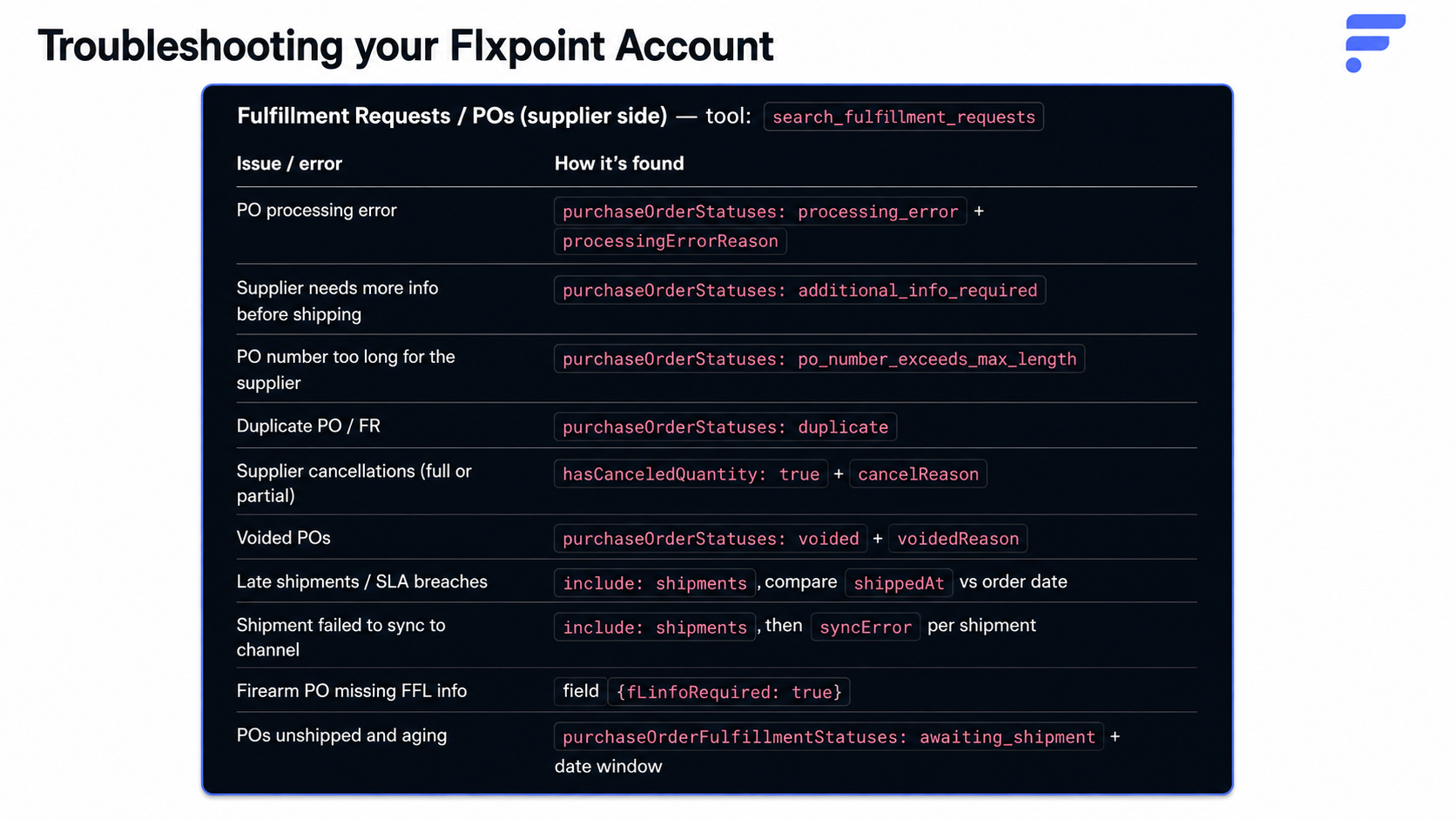
The supplier-side view. Same idea, just flipped to the PO and fulfillment request side of the order.
Try:
"Find my POs with processing errors and explain what needs to be fixed."
Routing Troubleshooting
Sometimes an order just sits there. It doesn't route to a supplier, and the reason isn't obvious from the order screen alone. Claude reads your routing logs and tells you why in a sentence instead of a status code.
Here's a real example. We set up a Cowork automation that checks every hour for orders that failed to route, then posts the results straight to Slack. This is what came back the first time it ran:
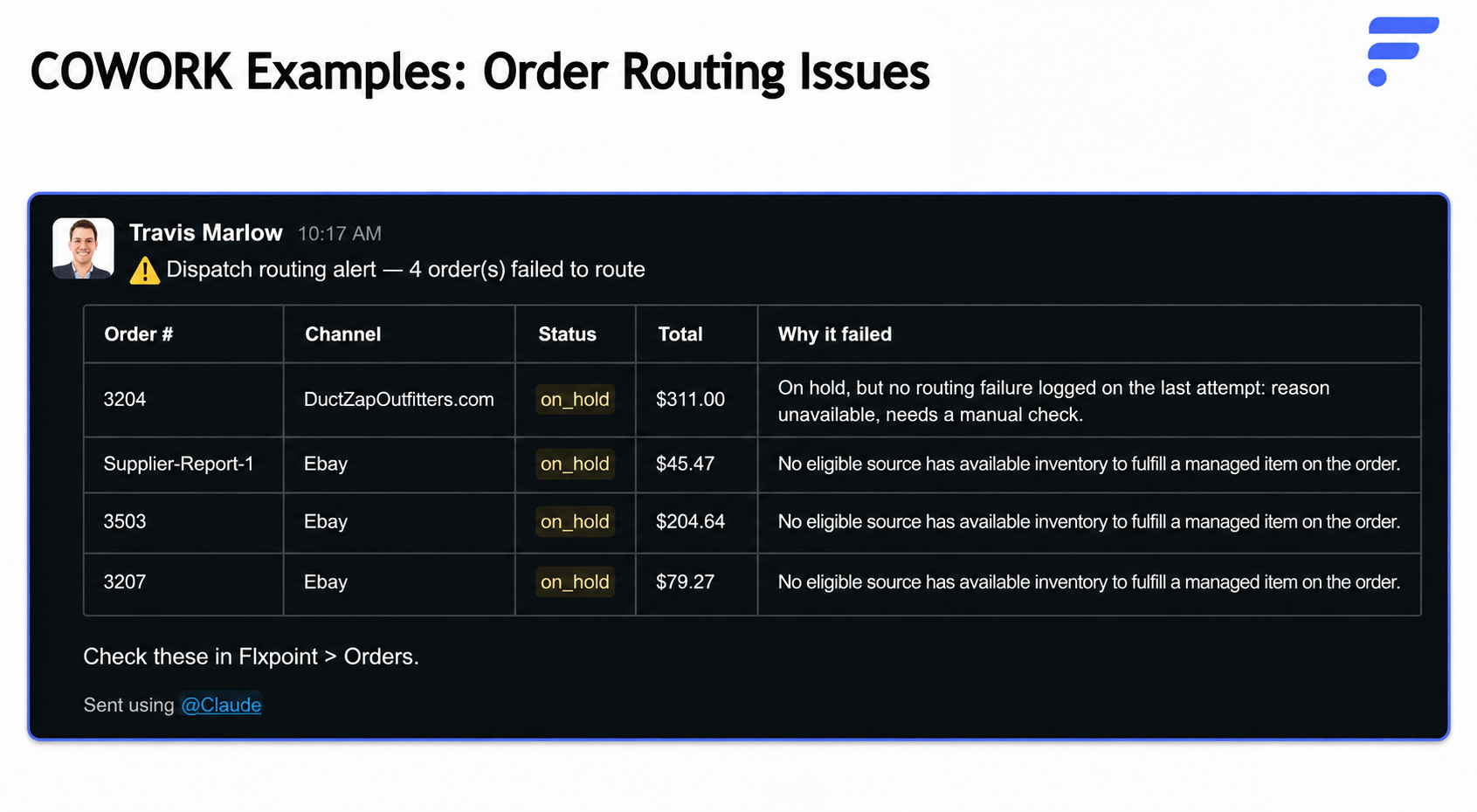
A real Cowork alert. Notice it doesn't just say “on hold.” It tells you the actual reason, like no eligible source having available inventory.
Notice the last column. It doesn't just say the order is on hold. It says why: no eligible source has inventory to fulfill a managed item, or the routing attempt didn't log a reason at all and needs a manual look. That's the difference between a status flag and an actual answer.
Try:
"Why did this order not route?"
Or:
"Why did this order route to this supplier instead of the supplier I expected?"
Late Shipments and SLA
An SLA, in plain terms, is just the promise your supplier makes about how fast they'll ship after you send a PO. We set every account to a two-day default SLA automatically, and if you've already set your own thresholds, we leave those alone. You can also override the default for a specific supplier.
Claude uses that threshold to tell you who's actually late, not who might be late. Here's a real daily check running through Cowork:
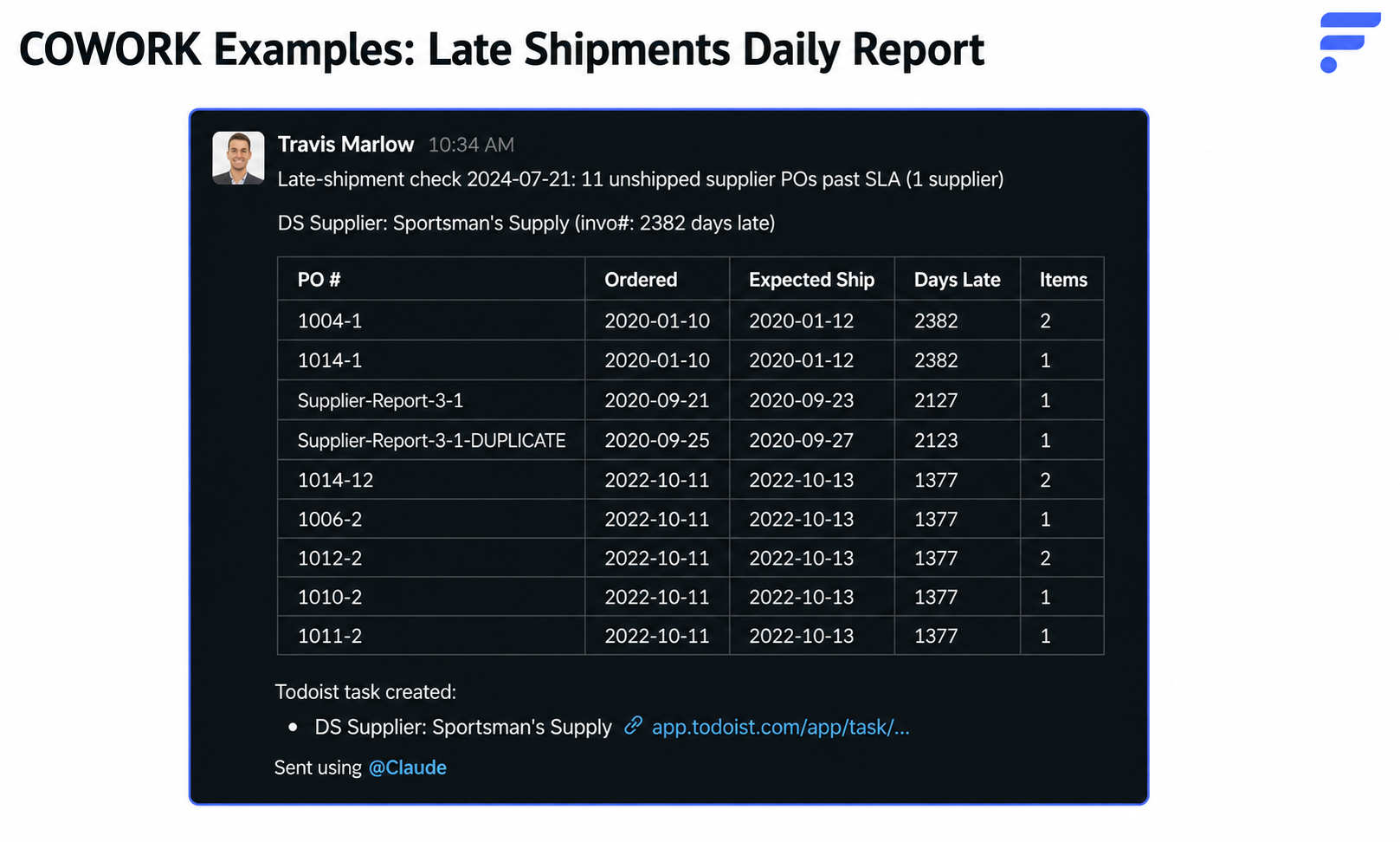
A daily late-shipment check. Eleven POs from one supplier, each with the exact number of days late.
And it doesn't stop at a list. The same Cowork automation created a task with a pre-written follow-up email that included the relevant PO details
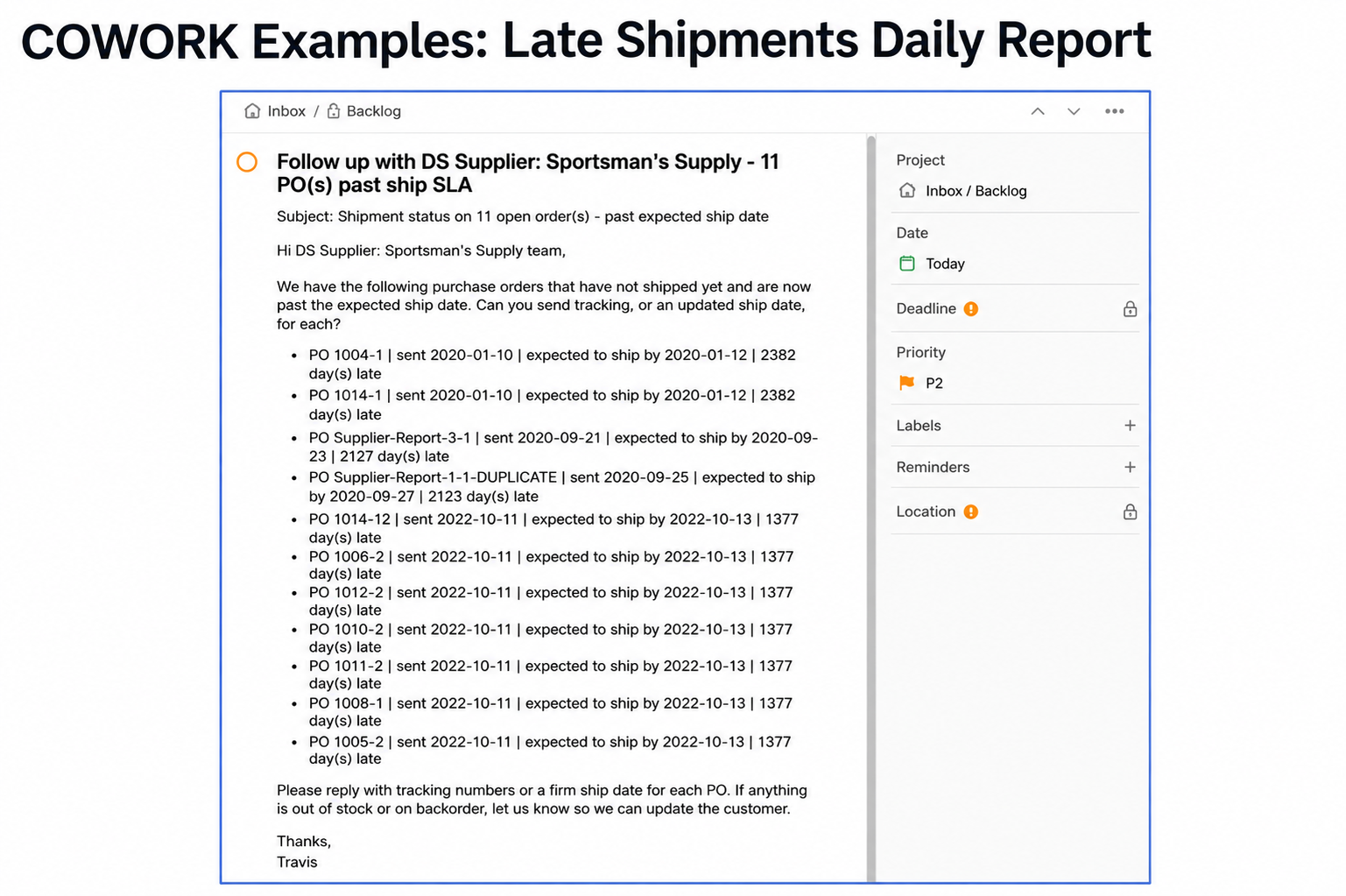
The follow-up email Claude drafted from that same late-shipment check, ready to copy, paste, and send.
That's the whole point of connecting Claude to your Flxpoint data. When you use MCP with an automation tool such as Cowork, you can go beyond identifying an issue and build the next step into the workflow.
Try:
"Which sources have the most late shipments against their SLA?"
Or:
"Show me the actual POs that are the most overdue."
One thing worth knowing: Claude keeps unshipped orders and shipped-late orders separate by default, since they mean different things operationally, even though both count as late against your SLA. You can ask it to combine them or keep them apart, and it rebuilds the view either way.
Cancellation Rates
We draw a hard line between two things that look similar but mean opposite outcomes. A voided PO is one you canceled before it ever reached the supplier. A canceled PO is one the supplier canceled after you already sent it. Claude keeps that distinction straight, which matters because lumping them together makes your cancellation rate look worse than it actually is.
You already saw the fields behind this in the order and PO tables above, the ones marked canceled, killed line items, supplier cancellations, and voided. Claude reads all of them and sorts out which is which.
Try:
"What is my PO cancellation rate by source?"
Then:
"Exclude voided POs from the cancellation rate."
Claude will apply that methodology automatically, and it can explain why voided POs get excluded if you ask.
Profitability
Profitability only works if you're uploading or integrating supplier invoices.
When invoices are flowing, Claude compares what a supplier actually billed you, the per-unit cost on the invoice, against your catalog cost. That gap is where margin gets won or lost, and it's usually invisible until someone goes digging.
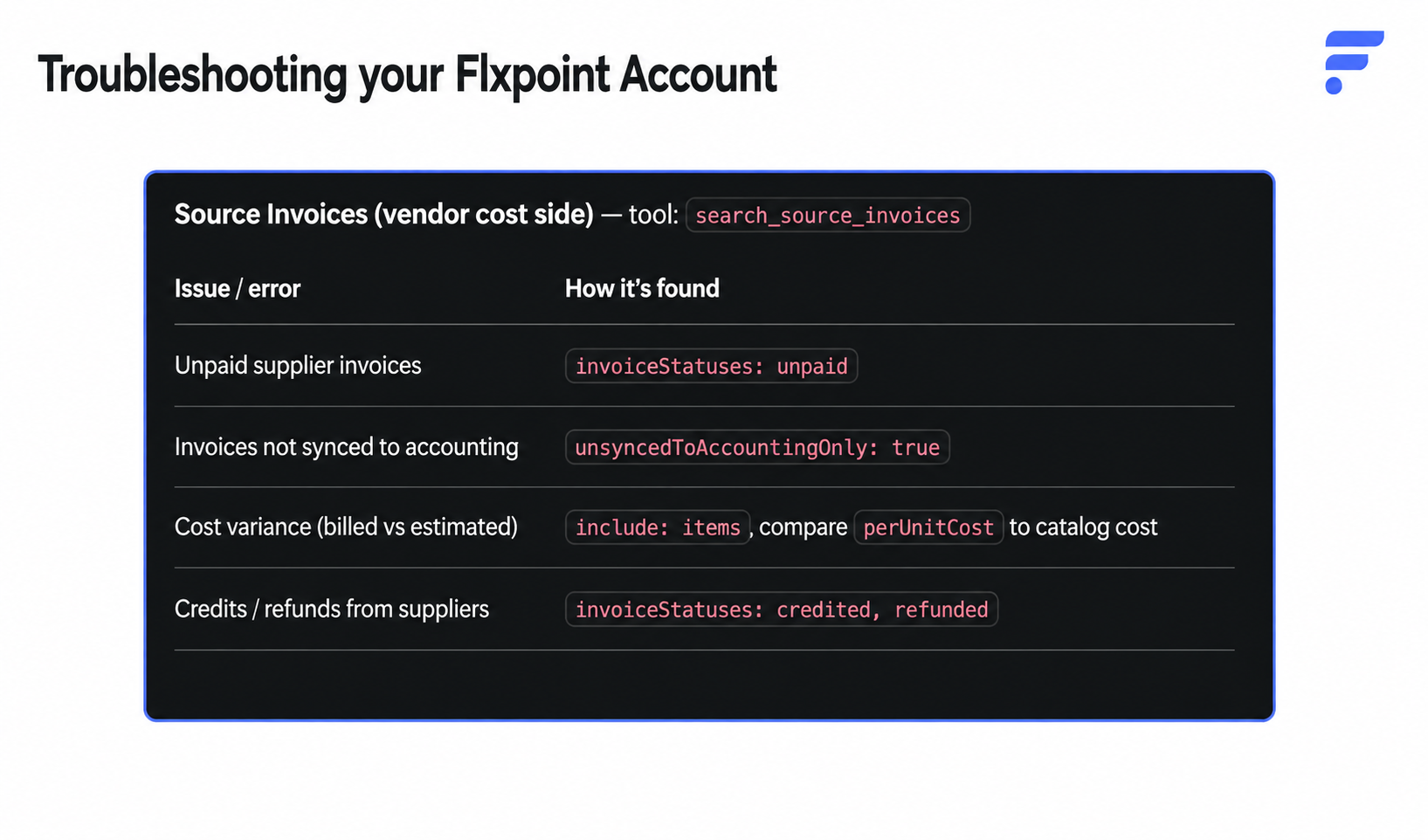
This is what Claude checks on the invoice side: unpaid invoices, invoices that never synced to accounting, cost variance against catalog cost, and supplier credits.
Here's what that looks like once you ask for a real breakdown by channel:
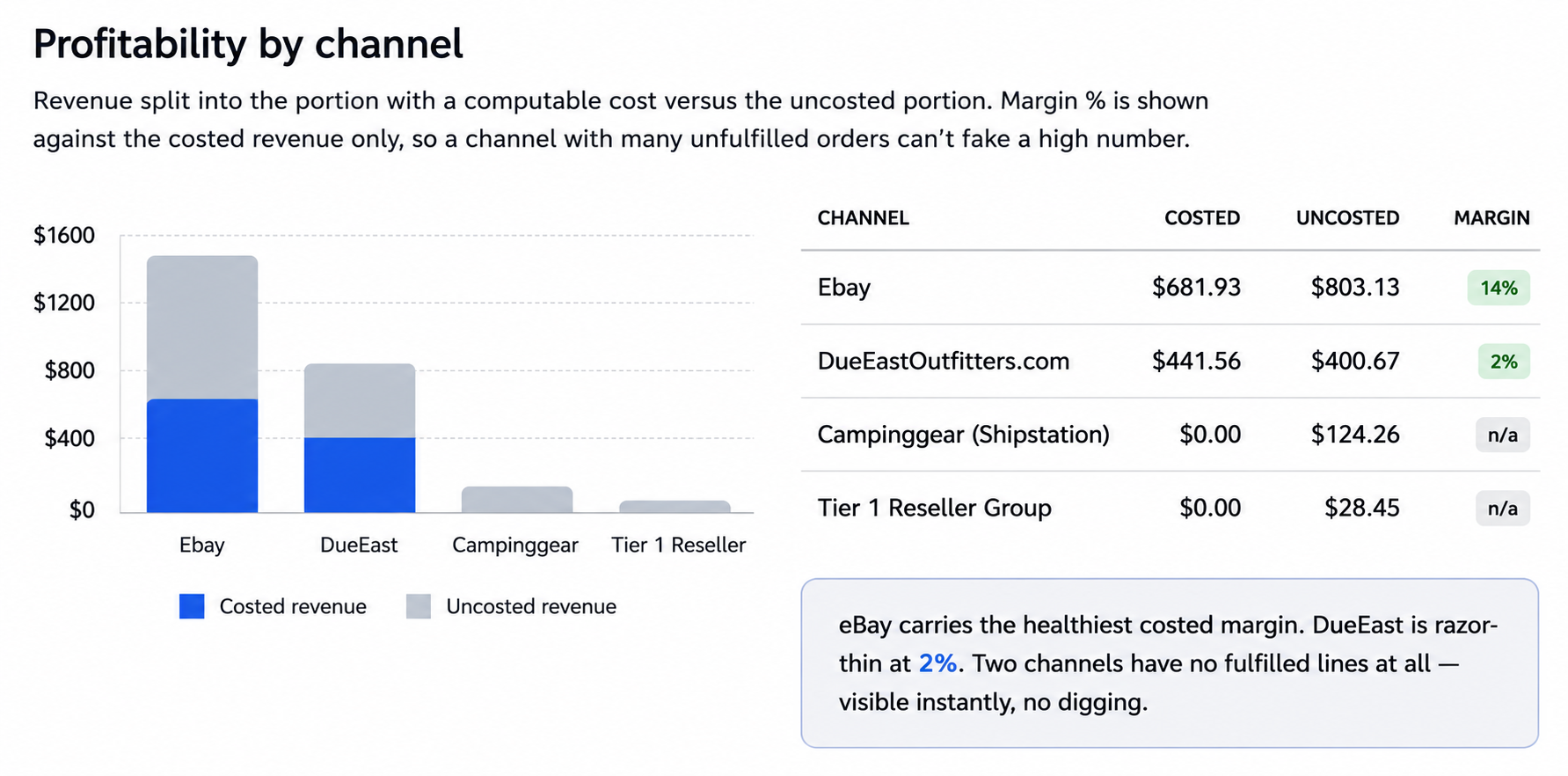
Profitability by channel. Note the two channels with zero costed revenue, meaning nothing has invoiced yet, which is exactly the kind of gap this is built to surface fast.
Notice how the chart splits revenue into costed and uncosted, and calculates margin only against the costed portion. That's on purpose. A channel full of unfulfilled orders can't fake a healthy margin, because Claude only scores the part of the revenue it actually has a real cost for.
Try:
"Break down profitability by source and channel in my Flxpoint account."
Or:
"Which source has the highest margin?"
Vendor Scorecard
We built a specific workflow inside the MCP just for this. Ask for a vendor scorecard, and Claude asks a couple of preset questions based on what's in your account, then builds a single, ranked view of supplier health.
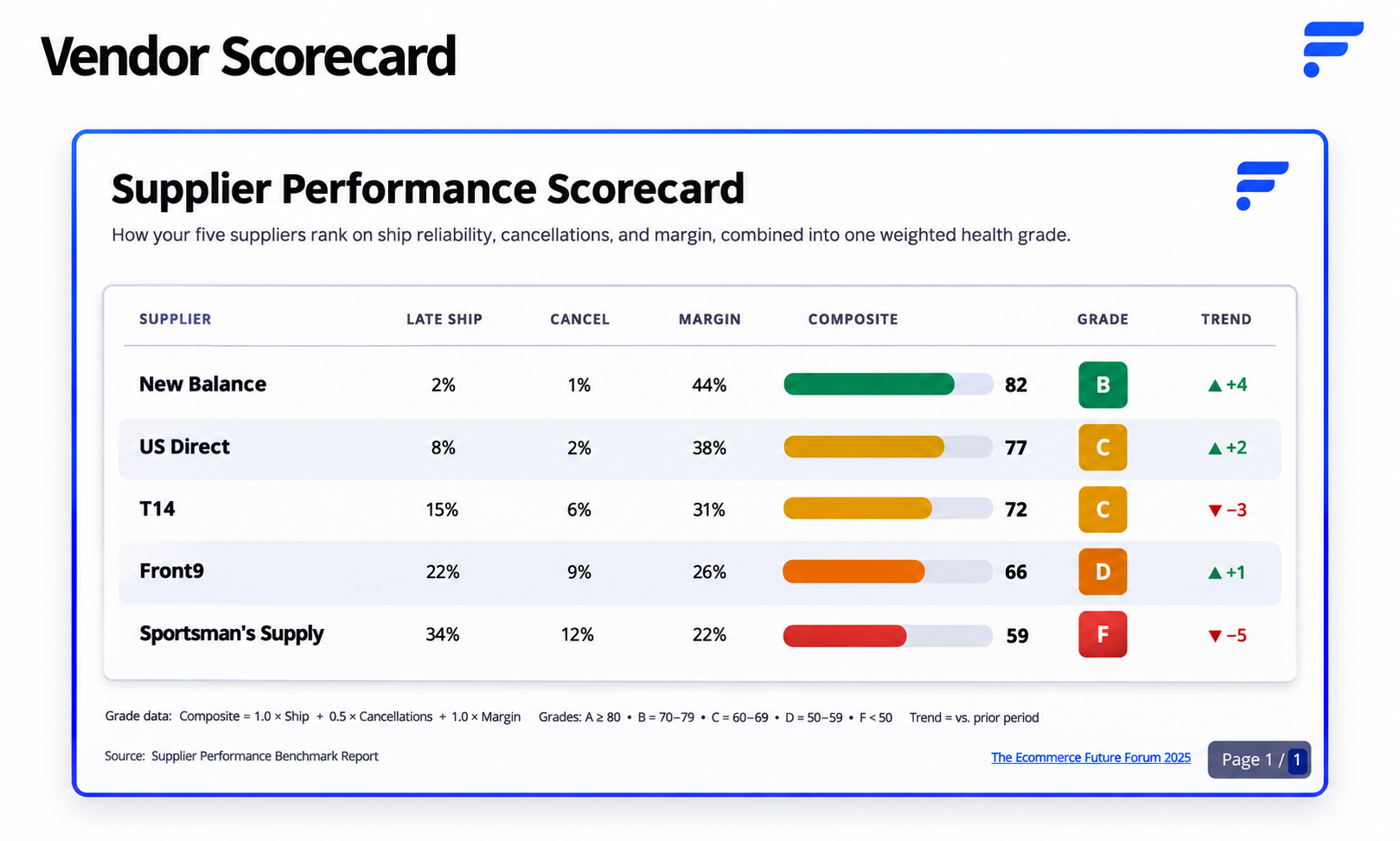
A real vendor scorecard. Late-ship rate, cancellation rate, and margin all rolled into one composite grade per supplier.
The composite score blends late-ship rate, cancellation rate, and margin into a single letter grade, so you can see at a glance which suppliers are actually pulling their weight and which ones are quietly costing you money. The trend column shows whether each supplier is moving up or down compared to the prior period, so you're not just looking at a snapshot.
Try:
"Build me a vendor scorecard for my Flxpoint account."
If Claude doesn't pick up that you want it pulling from your connected account, just say so directly:
"Build me a vendor scorecard using data from my Flxpoint MCP."
Conclusion
Flxpoint MCP is most useful when you treat it as a way to ask questions about the operational work already happening inside Flxpoint.
You can start with a simple question about an order, then drill into the reason it failed. You can compare suppliers against SLA targets, investigate cancellations, reconcile supplier costs, analyze profitability, or build a vendor scorecard without manually assembling the data first.
And because MCP works with Flxpoint-specific data and terminology, you can ask those questions in the language you already use to run your business.
The result is a simpler way to get from “Something looks wrong” to “Here is what happened, here are the affected records, and here is what I should look at next.”
Ready to Put Flxpoint MCP to Work?
If your team spends too much time digging through orders, POs, supplier performance, and operational reports, Flxpoint MCP can give you a faster way to get answers from your Flxpoint data.
See how Flxpoint can help you automate and scale your ecommerce operations.