ERP, WMS, and 3PL Fulfillment Automation
Ecommerce fulfillment automation ties your ERP, WMS, 3PLs, suppliers, and sales channels into one workflow. Here is why that is hard, and what a platform needs to manage it.
Ecommerce fulfillment automation connects your sales channels, suppliers, and warehouse systems so orders move from purchase to delivery without manual steps.
For a multi-channel operation, that usually means tying together an enterprise resource planning system (ERP), a warehouse management system (WMS), one or more third-party logistics providers (3PLs), and your suppliers.
Getting them to act as one flow is the hard part, because each system was built for its own job, not to talk to the others.
This article explains why that is, and what a platform needs to manage the whole chain.
What is ecommerce fulfillment automation across ERP, WMS, and 3PL systems?
Ecommerce fulfillment automation is the process of moving an order through every system it touches, from the sales channel to the ERP, WMS, 3PL, or supplier, and back out as a shipment, without a person carrying data between them by hand. It turns a chain of separate tools into one connected flow.
In a small setup, one person can bridge the gaps. They copy an order into the warehouse system, check stock, and update the channel when it ships. In a multi-channel operation, that breaks down fast. Orders arrive from several channels at once, stock sits in more than one place, and each system holds its own version of the truth.
Order arrives from any sales channel
System decides where it should be filled
Routes to the right warehouse, 3PL, or supplier
Inventory, status, and tracking stay in step
The goal is not to replace your ERP or WMS. It is to connect them, so each does its job and the data moves between them on its own.
Why is connecting these systems so hard?
Connecting these systems is hard because each one was built for a different purpose and does not naturally share data with the others. Left alone, they hold separate records, update at different speeds, and disagree about what is in stock. That is where errors and delays come from.
Each system speaks a different language
An ERP, a WMS, a 3PL, and a supplier feed each store data their own way. They use different field names, different formats, and different ways of sending information. One may offer an API, another a scheduled file, another an older business format. Before anything can flow, all of that has to be mapped into one shared structure.
Timing gaps create errors
Systems update on their own schedules. Your ERP may post stock once an hour. A 3PL may confirm a shipment on a delay. A supplier feed may refresh twice a day. In the gap between updates, one system shows stock that another has already sold. That gap is where overselling and cancellations happen.
No single source of truth
When several systems each hold a stock number, which one is right? Without a clear rule, a late feed can overwrite a good number with an old one. The same problem hits pricing, order status, and product data. Someone has to decide which system owns each value.
The work grows with every connection
Two systems make one connection. Add a third and the links multiply. Add channels, warehouses, and suppliers, and you have a web of point-to-point connections that each break on their own. Every new supplier or channel becomes its own project, and the maintenance never stops.
What does each system do in the fulfillment stack?
Each system in the stack owns one part of the job. Knowing what each is for, and what it is not for, makes it clear why they have to be connected rather than replaced.
The ERP
The ERP is your system of record for the business. It handles money, purchasing, accounting, and often core inventory and reporting. It is built for financial control, not for real-time, high-volume order routing across many channels. ERP integration matters because the ERP needs clean order and cost data, but it should not be doing the moment-to-moment routing work.
The WMS
A warehouse management system runs the physical warehouse: receiving, put-away, picking, packing, and stock locations. It is strong inside the four walls of a warehouse. WMS integration matters because the WMS holds the real stock picture for owned inventory, and that picture has to reach your sales channels quickly.
The 3PL
A third-party logistics provider stores and ships your products for you. If you use one or more 3PLs, each holds some of your stock and handles fulfillment from its own location. 3PL integration matters because orders need to route to the right 3PL, and stock and tracking have to flow back without manual updates.
Suppliers and sales channels
Suppliers provide dropship inventory you list but do not hold. Sales channels are where customers buy: your own site and the marketplaces. Supplier integrations bring in stock and route dropship orders, while channel connections take orders in and send availability and tracking out. Both ends have to stay in step with everything in the middle.
How do these systems actually work together?
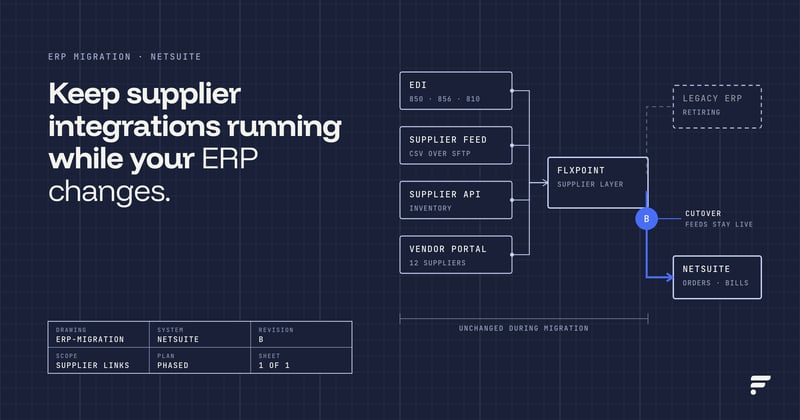
They work together through a central layer that sits between all of them and moves data along defined rules. Instead of wiring each system directly to every other one, you connect each to one hub, and the hub keeps them in sync. This is the job of an ecommerce automation platform.
Here is the flow in plain terms. An order arrives from a channel. The hub reads it, checks the stock that is live across your warehouses, 3PLs, and suppliers, and decides where it should be filled. It sends the order to that source, whether that is a WMS, a 3PL, or a supplier.
It lowers the stock everywhere at once so nothing oversells. When the source ships, it pulls the tracking back and pushes it to the customer, and it passes the order and cost data to the ERP for the books.
What the hub does
- It maps every system's data into one shared format.
- It holds the rules for which system owns each value.
- It routes each order using current stock, cost, and location.
- It keeps inventory and order status aligned across every connected system.
- It flags the exceptions that need a human, and handles the rest on its own.
This is the role Flxpoint plays. It connects your channels, suppliers, warehouses, and 3PLs, and it integrates with ERP systems such as NetSuite, so the order management and routing run in one place while your ERP and WMS keep doing what they do best. You can see how the ERP side connects on our NetSuite integration page.
The gain from this hub model is not only fewer manual steps. It is one clear picture of your operation. When every system reports into one place, you can see stock across all locations, track an order from any channel, and spot a slow supplier or a failing feed before it reaches a customer.
A web of direct, system-to-system connections cannot give you that view, because no single point sees the whole chain. The hub does, which is why it scales as you add channels, warehouses, and suppliers.
How does multi-warehouse and multi-supplier fulfillment work?
Multi-warehouse and multi-supplier fulfillment work by treating every stock location, whether a warehouse, a 3PL, or a supplier, as an option the system weighs on each order. The platform then routes the order to the best source using rules you set. This is where good automation earns its keep.
Multi-warehouse fulfillment
When you hold stock in more than one place, each order needs a decision: which location fills it. The usual logic runs closest location first, to cut shipping cost and time, then the next-closest if the first is out, then a backup. The system should also stop sending orders to a location before it runs dry, not after.
Closest location with stock on hand
Next-closest location, if the first is out
Held in reserve if both are unavailable
Multi-supplier fulfillment
When several suppliers carry the same item, the platform should compare them on every order:
- Which supplier has the item in stock right now.
- What each one charges, including shipping.
- Which one sits closest to the customer.
- How each one performs on speed and accuracy.
It then routes to the best fit and keeps a backup ready if the first source fails. When one order holds items from different sources, the platform splits it, sends each part to its own source, and keeps it as one order to the customer.
| Example comparison | Supplier A | Supplier B | Supplier C |
|---|---|---|---|
| In stock right now | Yes | Yes | No |
| Cost plus shipping | Higher | Lowest | N/A |
| Distance to customer | Far | Close | N/A |
| Speed and accuracy | Average | Strong | N/A |
Order routing is the engine behind both. The rules should be yours to set, per item or per source, so the system matches how your operation actually runs.
Why do real-time inventory and order status sync matter?
Real-time inventory and order status sync matter because every routing decision and every customer update depends on current data. If the numbers lag, the system routes wrong, oversells stock, and leaves customers with stale information. Sync is what keeps the whole flow honest.
Real-time inventory sync
Inventory sits in many places at once: your WMS, your 3PLs, and your supplier feeds. A sale in one channel has to lower the count everywhere, fast, or a second channel sells the same unit. Real-time or near-real-time sync closes that gap.
Buffers help too, so you never publish a supplier's full quantity when their feed runs behind. Clean inventory management across every source is the base that routing stands on.
Channel A sells the last unit. Channel B still shows it in stock for minutes or hours. A second customer orders it. One of the two gets cancelled.
Channel A sells the last unit. Every other channel drops to zero within seconds. No second sale, no cancellation, no manual cleanup.
Order status sync
An order moves through stages: received, processed, shipped, delivered. Each system needs the same status at the same time. When the 3PL ships, the channel should show it and the customer should get tracking, without anyone typing it in.
When an order is cancelled, the stock should return and the records should match. Order status sync keeps your channels, your ERP, and your customers looking at one consistent picture.
What capabilities should an ecommerce automation platform have?
An ecommerce automation platform should connect every system you run, route orders by your rules, and keep data in sync across the whole chain. If you are evaluating platforms, judge each one against the same list rather than a feature count.
- Broad integrations. Connects to ERPs, WMS, 3PLs, suppliers, and sales channels, in the formats they use: API, EDI, CSV, FTP. Gaps here become manual work.
- Real-time inventory sync. Pulls stock from every source often and pushes current availability to every channel, with buffers to guard against feed delays.
- Flexible order routing. Routes by stock, cost, location, speed, and source performance, with rules you set and backups for each item.
- Multi-warehouse and multi-supplier support. Treats every location and supplier as a routing option and splits orders across them when needed.
- Order status sync. Keeps order states and tracking aligned across channels, the ERP, and the customer.
- Fulfillment rules. Lets you build the decision logic your operation needs, not a fixed path.
- Multi-channel order management. Brings orders from every channel into one workflow instead of managing channel by channel.
- Exception handling. Runs the normal cases on its own and flags only the orders that need a person, with clear alerts and retries.
A platform that covers these connects your stack into one flow. One that misses a few leaves you filling the gaps by hand, which is the cost automation was meant to remove.
How do you choose the right platform?
Choose the platform that fits the systems you already run and the way your orders actually flow, not the one with the longest feature list. Start with your own setup, then match a platform to it.
- List your systemsWrite down your ERP, WMS, 3PLs, suppliers, and sales channels, and how each sends data.
- Map your order flowTrace how an order moves today, and mark every point where someone moves data by hand.
- Match the integrationsConfirm the platform connects to your specific systems, not just to the category in general.
- Test the routingTake a real order that two sources could fill at different costs and locations, and check the platform routes it the way you need.
- Check the exceptionsSee how it handles a failed feed, a stockout, or a cancelled order, since that is where weak platforms fall down.
The right platform reduces manual work, keeps your data in step, and grows with you as you add channels, warehouses, and suppliers.
If your operation runs a mix of ERP, WMS, 3PL, and supplier systems, we would be glad to show you how Flxpoint connects them into one flow. You can start with our order management overview.
Frequently asked questions
Run your ERP, WMS, 3PLs, suppliers, and sales channels as one connected flow, with Flxpoint as the hub in the middle.
Book a demo